A supplier quotation comparison template brings each supplier’s prices, scope, delivery commitments and commercial terms into one review. For building materials, start with the same item list and specification references, calculate the costs the project must pay, and resolve omissions before ranking offers.
Use the free Excel workbook below to compare up to three suppliers across 30 material items. It keeps original quotation inputs separate from calculated values and includes a worked example showing why the lowest material price may produce a higher evaluated cost.
Written by Winston, Project Director at Skyland Building · 10+ Years of Building Materials Experience
Updated October 2026 · 12-minute read
Download the free supplier quotation comparison template
Download the Supplier Quotation Comparison Template in Excel.
The workbook contains a blank comparison for your project and a separate Example sheet with fictional figures. Enter your own quotations in the working sheets. Amber cells are editable inputs; calculated cells use a different fill. The comparison stays incomplete when required information is missing.
| Worksheet | Purpose |
|---|---|
| Comparison | Supplier details, additional costs, eligibility, scoring weights and recommendation fields. |
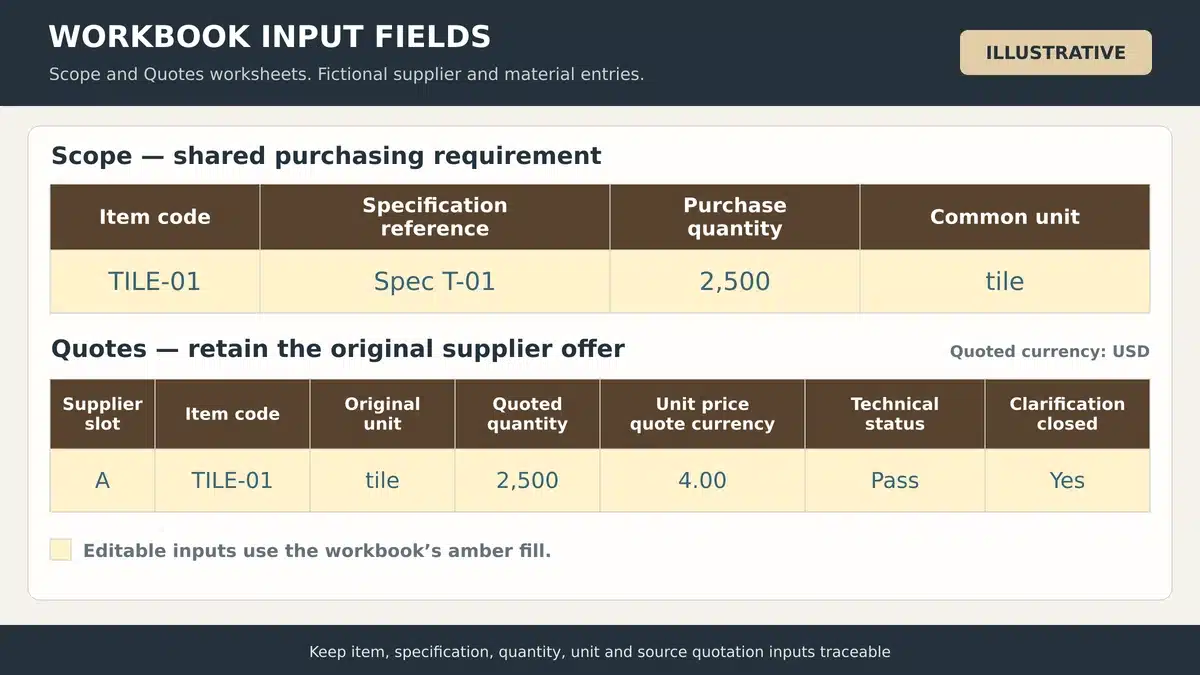
| Scope | Shared item codes, descriptions, specification references, purchase quantities and units. |
| Quotes | Original supplier quantities and prices, unit conversions, technical status and clarification records. |
| Example | A fictional comparison with visible cost calculations and an unconfirmed offer. |
Use one workbook per package or clearly defined evaluation scope. This version compares complete packages. If you intend to award different lines to different suppliers, assess the resulting minimum orders, split freight, interfaces and warranty responsibilities separately.
What to include in a supplier quotation comparison template
A useful quote comparison sheet should let a reviewer trace each result to the original offer. Retain the quotation files and identify the version used. Separate a confirmed zero charge from a blank field that still needs an answer.
| Field group | Information to retain |
|---|---|
| Project basis | Package, evaluation date, evaluation currency, destination and required arrival date. |
| Material scope | Item code, specification revision, unit, purchase quantity and required accessories. |
| Supplier offer | Supplier name, quotation reference, original currency, validity date, quantities and rates. |
| Cost adjustments | Discount, additional freight, packing, insurance, handling, tax or duty and other charges. |
| Technical review | Product conformity, deviations, required documents and clarification status. |
| Commercial review | Payment triggers, warranty, delivery commitments and accepted mandatory conditions. |
| Decision record | Scores, weights, selected supplier, reviewer, reasons and conditions before ordering. |
Keep quotation comparison distinct from supplier qualification. Use the construction supplier prequalification checklist to review capability before an attractive quotation becomes an order recommendation.
How to compare supplier quotes using the template
Set up the common scope
Populate Scope from the current BOQ, material schedule and drawings. Give each item a unique code and record the purchase quantity you actually want priced. Keep allowances and pack rounding traceable in the quantity notes. The material takeoff and BOQ guide explains how measured quantities connect to priceable items.
Issue the same references to every bidder. Use the building materials RFQ guide to define response fields, permitted alternatives and inclusions before quotations arrive. If the specification changes, revise the baseline and ask affected suppliers to reconfirm their offers.
Enter supplier and quotation details
In Comparison, enter the supplier names, quotation references, original currencies and valid-until dates. Record the common evaluation currency and the exchange rate used for each offer, expressed as evaluation-currency units per one unit of quoted currency. Enter 1 only when no currency conversion is required.
Use a stated rate source and date for the review. An evaluation rate is an assumption for comparison; it does not lock the exchange rate of a later payment. Retain the payment clauses, deposit triggers and warranty wording alongside the quotation reference.
Review technical scope and resolve clarifications
Match the offered product to the specified dimensions, finish, grade, performance and included components. The technical submittal checklist helps identify the evidence that the project team needs to review. A certificate or datasheet must relate to the offered product and relevant requirement.
Use Pass, Pending or Fail for each quoted line. Mark clarifications closed only after the response is recorded. Keep alternatives separate until the responsible reviewer accepts them against the revised scope. The workbook excludes incomplete or held packages from its eligible-cost comparison.
Enter prices and additional costs
On Quotes, use one row per supplier and requested item code. Enter the original unit, quoted quantity and unit price. Add the confirmed conversion factor to the common unit. The sheet calculates the quoted line amount, common quantity and common-unit price, and flags duplicate codes or a quantity below the requested amount.
Enter additional costs in the evaluation currency on Comparison. Include a charge only once. Where freight or packing is already included in the line price, record a confirmed zero in the additional-cost field and explain the inclusion in the notes. Leave an unconfirmed amount blank so that the evaluated total remains unavailable.
Check delivery against the project date
Record the promised arrival date and compare it with the required date. Define the trigger for any production lead time, such as deposit receipt and approved drawings. A production duration does not include every review, inspection, booking, transit or site-receiving step.
Connect the commitment to the construction procurement schedule. The workbook shows arrival-date variance in days when both dates are present. Decide whether a late proposal is unacceptable or can proceed under a documented, approved recovery plan before marking mandatory conditions as passed.
Record the decision and control revisions
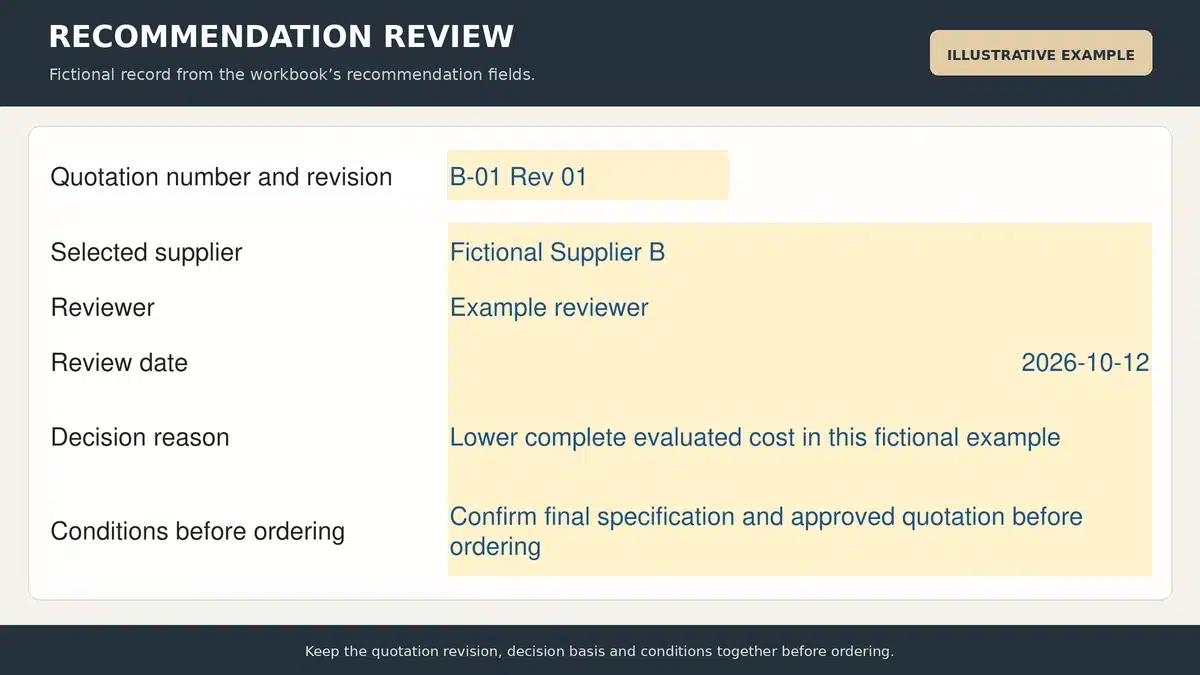
Complete the required reviews before applying the score. Record the selected supplier, reviewer, review date, reasons and outstanding order-release conditions. The highest score supports a recommendation; it does not place a purchase order.
Save the comparison with the source quotations and clarification responses. When a price, quantity or date changes, identify the new revision and review the affected calculations. Keep the final agreed scope and responsibilities consistent with the purchase order or contract.
Convert quotations to a common cost basis
Normalize units without losing the original offer
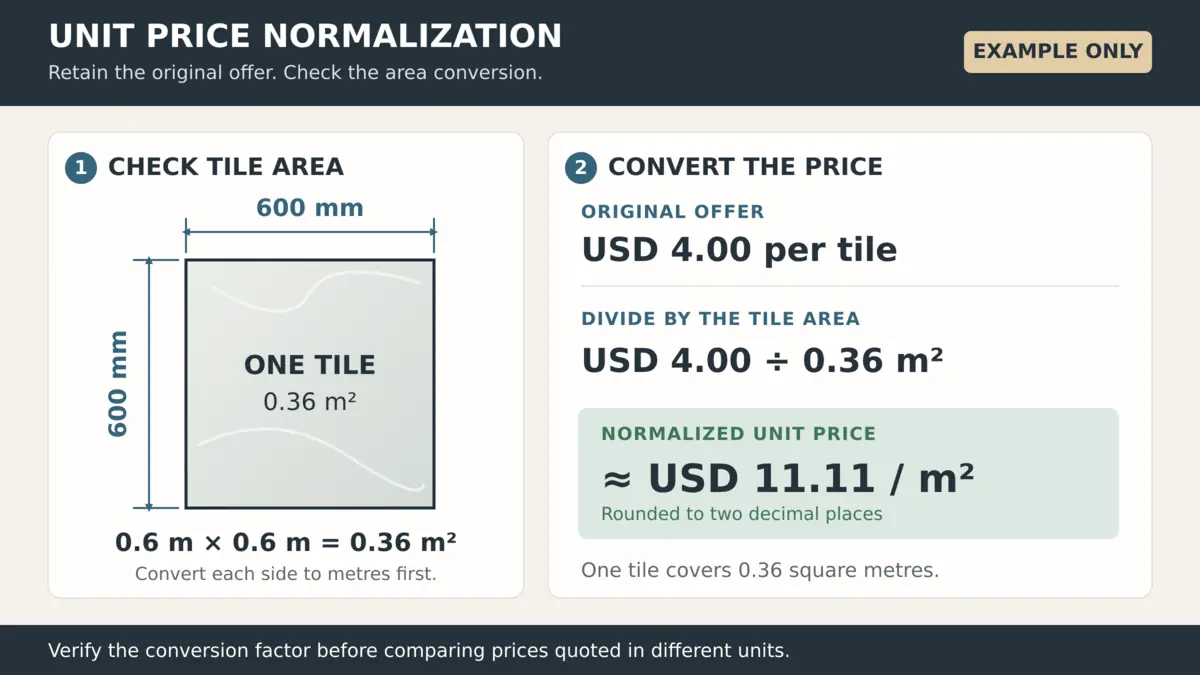
Define the conversion from the quoted unit to the requested unit using the selected product dimensions or confirmed packaging information. In the workbook, common quantity equals quoted quantity multiplied by common units per quoted unit. Common-unit price equals the quoted unit price divided by the same factor.
For an illustrative 600 by 600 mm tile, one tile covers 0.36 square metres. A price of USD 4 per tile therefore equals about USD 11.11 per square metre before quantity allowances or pack rounding. Confirm the actual dimensions and carton contents before using that relationship for an order.
Keep any excess purchase quantity visible. If a minimum order or full-pack requirement increases the quantity bought, compare the actual order amount and explain what will happen to the excess. A lower normalized unit price can still require more total spending.
Build an evaluated total from known amounts
The workbook calculates material subtotal from quoted quantities and prices, then converts that subtotal into the evaluation currency. It subtracts the confirmed discount and adds separately identified freight, packing, insurance, handling, tax or duty, and other required charges.
Apply one documented tax treatment across offers. Enter the amounts to add under that treatment rather than assuming the workbook calculates customs or tax liabilities. Retain the original quoted tax information and confirm the project treatment with the responsible finance or customs adviser.
Use the packing and labeling guide to define crate, protection and package-reference requirements before comparing packing charges. A supplier’s standard carton may cover a different scope from the packing specified for the shipment.
Confirm delivery terms and avoid double counting
Record the delivery rule, named place or port, and version where an Incoterms rule is used. The ICC explanation of Incoterms rules describes how they allocate specified delivery tasks, costs and risks. Confirm the remaining price, payment and project responsibilities in the commercial documents.
Bring all offers to the same evaluation destination. Add the buyer’s confirmed costs beyond each quoted delivery point and retain the basis of estimates. Where several factories share a shipment, use the consolidated shipping guide to review receiving, storage, consolidation and dispatch costs. Do not charge the same shared freight to every package in full.
Supplier quotation comparison example
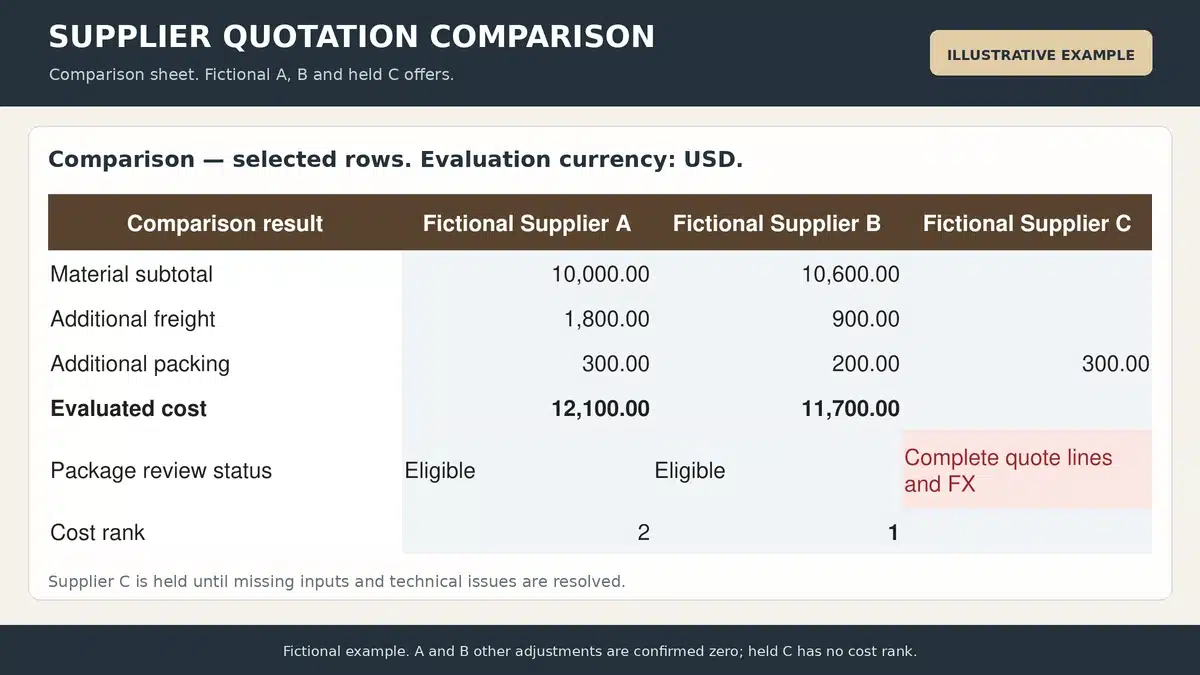
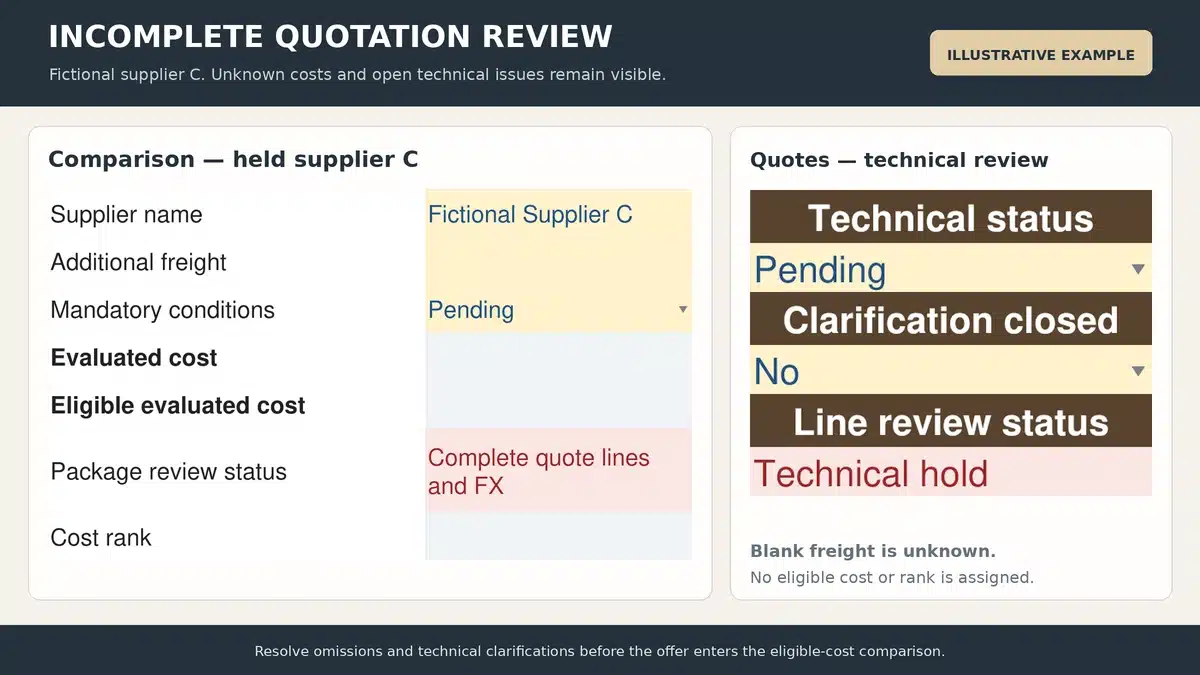
The following fictional example uses the same 100-unit scope and USD evaluation basis. For A and B, the products and mandatory conditions are assumed accepted, quotations are current, and all other additional costs and discounts are confirmed as zero. C still has an unconfirmed freight amount and technical clarification.
| Cost or review field | Supplier A | Supplier B | Supplier C |
|---|---|---|---|
| Quoted quantity | 100 | 100 | 100 |
| Unit price USD | 100 | 106 | 98 |
| Material subtotal USD | 10,000 | 10,600 | 9,800 |
| Additional freight USD | 1,800 | 900 | Unconfirmed |
| Additional packing USD | 300 | 200 | 300 |
| Evaluated cost USD | 12,100 | 11,700 | Unavailable |
| Review status | Eligible | Eligible | Pending clarification |
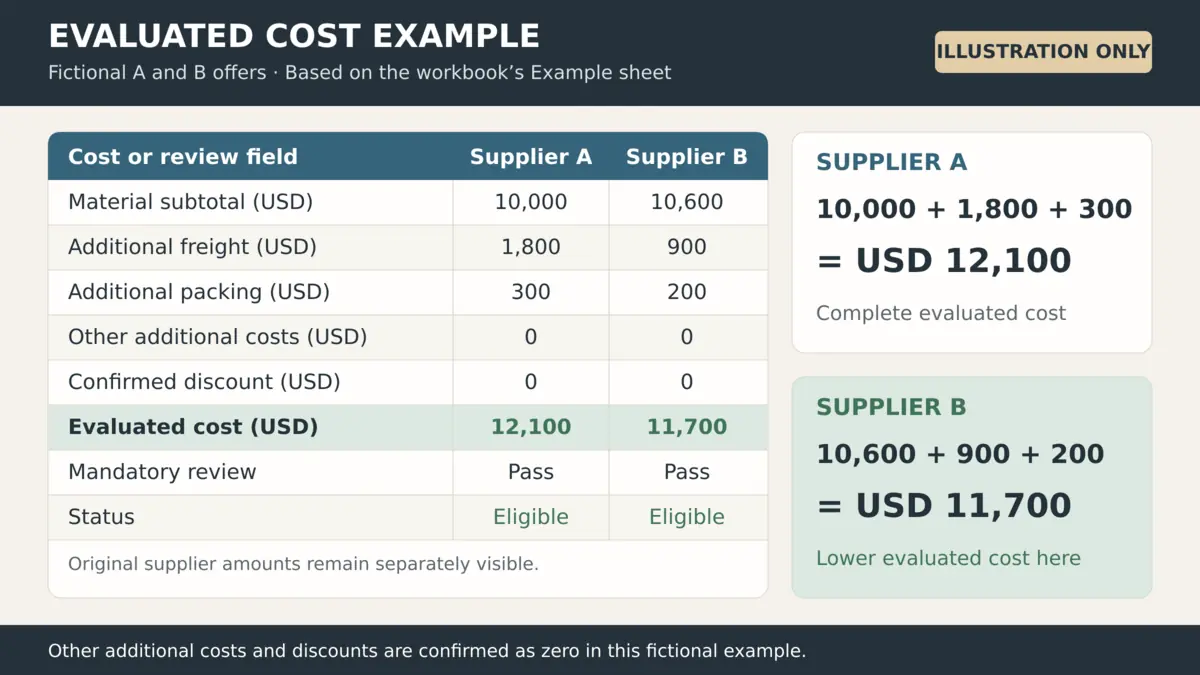
Supplier B’s material subtotal is USD 600 higher than A’s, but its evaluated cost is USD 400 lower after freight and packing. Supplier C’s USD 9,800 material subtotal cannot be treated as the lowest complete package cost while freight and technical scope remain unresolved.
Apply weighted scoring to eligible quotations
Agree criteria and weights before ranking
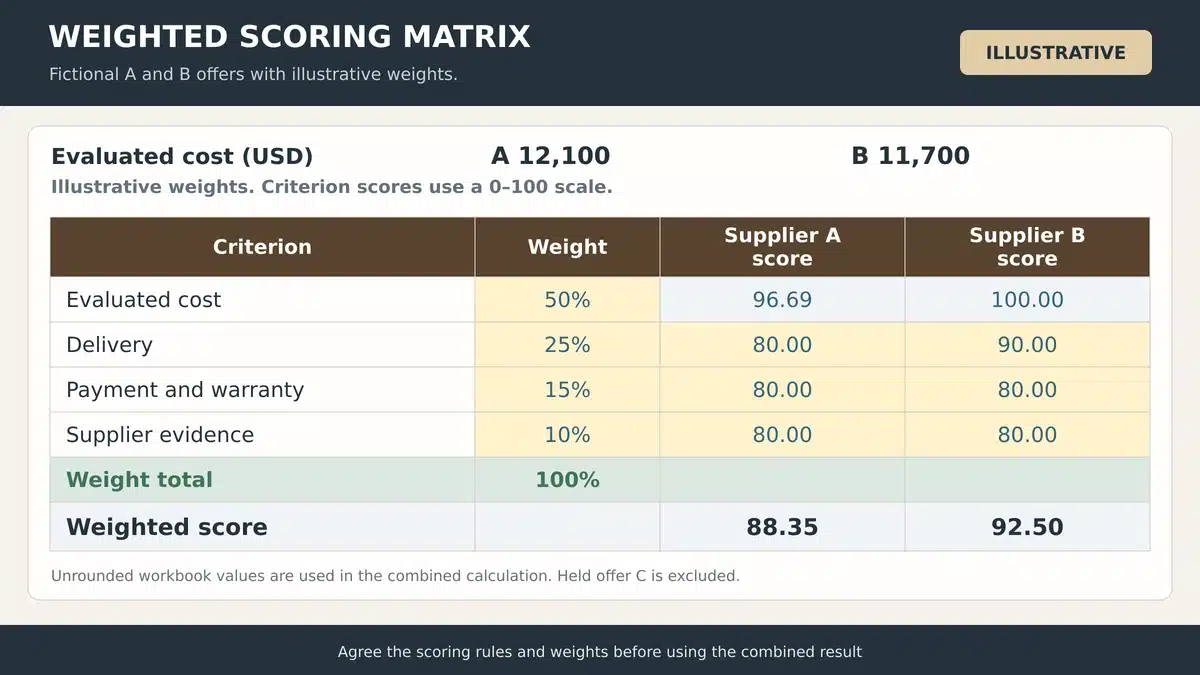
The template starts with illustrative weights of 50 percent for evaluated cost, 25 percent for delivery, 15 percent for payment and warranty, and 10 percent for supplier evidence. Edit them to reflect the package and agree the scoring rules before reviewing the result. The weights must total 100 percent.
Score the non-price criteria on a defined 0 to 100 scale and record supporting reasons. For example, distinguish a confirmed arrival commitment with usable schedule margin from an unconfirmed production estimate. Use the supplier audit checklist when manufacturing-route or process evidence is needed. A mandatory technical failure remains a hold, regardless of other scores.
Calculate cost and weighted scores consistently
Cost score equals the lowest eligible evaluated cost divided by that supplier’s eligible evaluated cost, multiplied by 100. The lowest positive eligible cost receives 100. In the example, B receives 100 and A receives about 96.69 for cost. An incomplete offer is excluded from the benchmark.
The weighted result is the sum of each criterion score multiplied by its weight. The workbook calculates a result only when the offer is eligible, all required scores are numeric and the weights are valid. A missing score stays unavailable rather than becoming zero. Equal scores receive the same rank, so the reviewer must resolve a tie.
Keep uncertainty and approval conditions visible
Do not insert a guessed freight amount or a favorable delivery score to finish the table. Obtain the missing response or identify a separately approved estimate and its source. Reassess the recommendation when a material assumption changes.
Before ordering, confirm the accepted deviations, payment milestones, final price, delivery basis, inspection requirements and responsibilities. Keep any conditions that remain open in the recommendation record.
Common quotation comparison mistakes
- Comparing material subtotals before checking freight, packing and essential exclusions.
- Treating a blank price, cost or score as a confirmed zero.
- Mixing pieces, sets, cartons and area rates without verified conversion factors.
- Accepting a cheaper substitute without the required technical review.
- Scoring an expired quotation as though its terms were still confirmed.
- Changing quantities or scoring weights without recording the revision and reason.
- Awarding lines separately without checking the effect on logistics, minimum orders and interfaces.
Supplier quotation comparison questions
What is a supplier quotation comparison template
It is a structured sheet for comparing supplier offers against a common purchasing requirement. It records original quotation data, scope differences, comparable costs, delivery terms and evaluation evidence so the recommendation can be reviewed.
Can I compare quotations in different currencies
Yes. Keep the quoted currency and use a documented exchange-rate basis to calculate results in one evaluation currency. The template uses evaluation-currency units per one quoted-currency unit. Record the rate source and review date.
Why is the cheapest quotation not always selected
A lower material price may exclude costs the buyer must pay, cover less scope or depend on unsuitable delivery terms. Review a complete evaluated cost and the mandatory conditions before using price in a weighted comparison.
How do I handle a missing quotation item
Keep the requested item in Scope and seek a clarification or revised offer. The workbook holds the package when a required line is missing. Do not remove the item solely to make that supplier’s total appear complete.
Can this Excel file be used in Google Sheets
The file is an XLSX workbook using conventional spreadsheet formulas. You can import it into Google Sheets, then check recalculation, dropdowns and conditional formatting before using it for an approval. The supplied file is an Excel workbook rather than a hosted Google Sheets document.
Does the template calculate tax or automatically award the order
No. Enter confirmed additional tax or duty amounts under the agreed evaluation basis. The template calculates costs and scores from the entered information, while the project team records the recommendation and issues the agreed purchasing documents.
Coordinate the building material quotation package
Skyland Building’s project material coordination service connects available drawings, schedules, product references and quotation inputs around the agreed project scope. Identify which product decisions and responsibilities still need confirmation before requesting final pricing.
Send your BOQ and quotation requirements with the project location, required categories, specification references, quantities and target delivery stages. The next step can then address the missing information needed for a comparable quotation.