
Material takeoff vs BOQ is the difference between measuring project quantities and organizing those quantities for pricing and commercial control. Compare purpose, fields, pricing, responsibility, and workflow—then use the downloadable workbook to connect measured quantities with BOQ items.
Written by Winston, Project Director at Skyland Building · 10+ Years of Building Materials Experience
Updated September 2026 · 13-minute read
Quick Answer
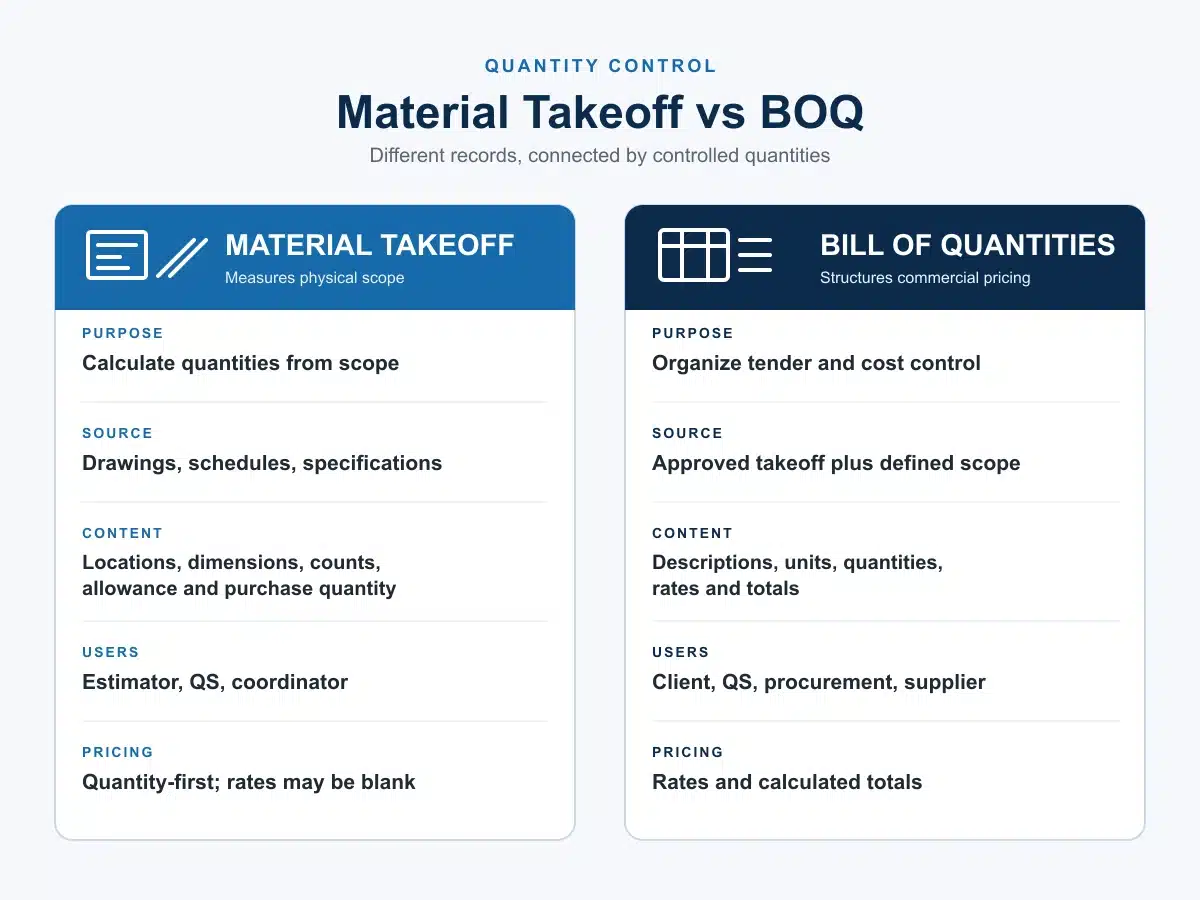
A material takeoff measures materials or construction quantities from drawings, schedules, specifications, or models. A BOQ organizes measured work into defined items that can be tendered, priced, compared, and administered. A takeoff can feed a BOQ, but the two documents are not interchangeable.
Key Takeaways
- A material takeoff stays close to the design source. Its main job is measurement and traceability.
- A BOQ stays close to the pricing and contract structure. It defines priceable work items, units, quantities, and commercial fields.
- Net measured quantity, allowance, pack rounding, and purchase quantity should remain separate so reviewers can see how the order quantity was formed.
- One stable item reference should connect the source drawing or model, takeoff line, BOQ item, RFQ response, approved change, and purchase record.
- Responsibility and contractual status vary by procurement route. State who measured, checked, approved, priced, and changed each record.
Material Takeoff vs BOQ: Quick Comparison
| Aspect | Material Takeoff (MTO) | Bill of Quantities (BOQ) |
|---|---|---|
| Primary question | What has been measured, and how much is required? | What defined work or supply item must be priced and controlled? |
| Main source | Drawings, schedules, specifications, model data, and measurement assumptions | Measured quantities plus descriptions, measurement rules, scope boundaries, and pricing structure |
| Typical content | Item or element, location, source reference, unit, net quantity, allowance, order quantity, notes | Item number, work description, unit, quantity, rate, amount, inclusions, exclusions, and references |
| Pricing | May contain no prices; can support an estimate or order calculation | Usually provides fields for tender or commercial pricing, although format varies |
| Typical users | Estimators, quantity surveyors, trade specialists, contractors, procurement teams | Clients, cost consultants, contractors, bidders, commercial and contract teams |
| Common uses | Feasibility, estimating, trade planning, material ordering, quantity checks | Tendering, bid comparison, cost control, valuation, variations, and procurement |
| Main control | Measurement accuracy and source traceability | Scope definition, comparable pricing, and commercial administration |
The distinction is about purpose, not spreadsheet format. Either document can be simple or detailed. Reliability depends on current source information, consistent units, clear descriptions, and controlled revisions.
What Is a Material Takeoff?
A material takeoff, often shortened to MTO, identifies and measures materials or construction elements from project information. The output may use counts, lengths, areas, volumes, weights, sets, or other units suited to the item. A useful takeoff also records where the quantity came from and which revision governed the measurement.
For example, a takeoff can list window types and counts from an opening schedule, floor finishes by room and area, concrete by element and volume, or cabinet units by room and type. It may stay close to individual drawing marks or combine measurements where the source, specification, and responsibility are the same.
What a Takeoff Should Record
- A stable MTO item ID and trade or package name.
- Location, room, zone, elevation, or assembly reference.
- Drawing, schedule, specification, or model reference and revision.
- Material or element description, type code, and measurement basis.
- Net measured quantity and unit.
- Allowance, pack or fabrication increment, and resulting purchase quantity where procurement needs them.
- Assumptions, exclusions, review status, checker, and date.
Material Takeoff vs Quantity Takeoff
Terminology varies. Some teams use quantity takeoff for all measured work and material takeoff for the purchasable materials within that work. Others use the terms interchangeably. Define the intended output, units, inclusions, and pricing basis in the project instructions instead of relying on the label alone.
What Is a BOQ?
A bill of quantities, or BOQ, is a structured list of measured work items with identifying descriptions and quantities. A BOQ commonly adds units, pricing fields, section structure, references, and rules that allow several parties to price or administer the same scope. For a detailed field-by-field explanation, use Skyland’s construction BOQ template and guide.
A BOQ can contain more than raw materials. Depending on the project, an item may include labor, plant, installation, accessories, testing, temporary work, overhead, or other obligations. The description and measurement rules determine what the tenderer is expected to include.
A formal tender BOQ may have a defined role under the contract. A supplier-facing pricing schedule may instead be an operational document derived from approved project information. Do not assume that a spreadsheet becomes a contractual BOQ simply because it contains quantities and rates.
The Eight Practical Differences
1. Purpose
A takeoff proves and records measurement. A BOQ defines how measured work will be described, priced, compared, and controlled.
2. Relationship to Source Documents
Takeoff lines should remain closely tied to drawing marks, model objects, schedules, or calculations. BOQ lines may combine several measurements into one priceable item, so the link back to the takeoff must remain visible.
3. Description Detail
A takeoff may record “T-01 floor tile, Level 2, 184.6 m².” A BOQ description may also define size, finish, substrate preparation, adhesives, grout, trims, installation, testing, or other inclusions required by the pricing basis.
4. Pricing
A takeoff can exist without prices. A BOQ normally supports rates and amounts, but the price content depends on the tender, estimate, valuation, or procurement purpose.
5. Quantity Basis
A takeoff can show net quantity, allowance, pack rounding, and order quantity. A BOQ quantity should follow the project’s stated measurement method. Waste may be included in the rate or presented separately under those rules; it should not be added silently.
6. Grouping
Takeoff data may be organized by drawing, room, level, type, or model element. BOQ data is commonly grouped by trade, work section, package, or cost structure so that bidders and commercial teams can respond consistently.
7. Users and Responsibility
Estimators, quantity surveyors, contractors, and trade specialists may produce takeoffs. BOQs may be prepared or checked by quantity surveyors, cost consultants, estimators, contractors, or other appointed parties. The contract and procurement route decide who owns the final quantity and description.
8. Change Control
A revised takeoff should show what measurement changed and why. A revised BOQ should also show how the changed quantity or description affects the pricing and commercial baseline. Neither record should overwrite an issued version without revision history.
How a Material Takeoff Becomes a BOQ
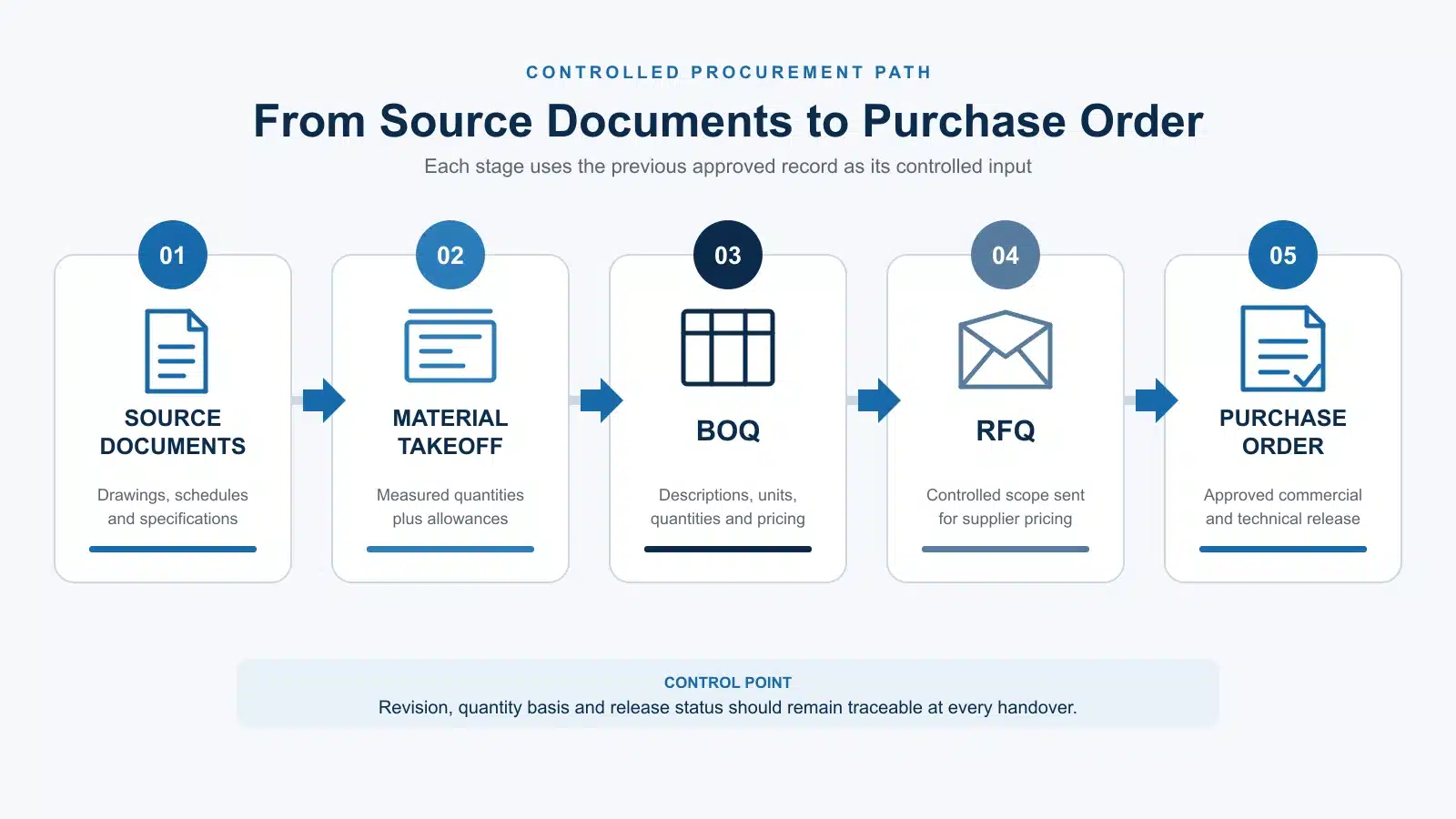
Conversion is a controlled translation, not a copy-and-paste exercise. The person preparing the BOQ must decide how measured elements become priceable work items and which obligations belong in each description.
- Freeze the measurement basis. Confirm the source register, revisions, scale or model status, units, and applicable measurement rules.
- Create the takeoff. Measure the current design, assign stable IDs, and record locations, sources, assumptions, and exclusions.
- Check completeness. Look for omitted areas, duplicate measurements, inconsistent units, unmeasured interfaces, and unresolved specifications.
- Build BOQ items. Group or split takeoff lines according to work section, specification, package boundary, installation responsibility, and pricing basis.
- Write priceable descriptions. State what the item includes, the governing references, unit, quantity, and how alternatives or qualifications must be reported.
- Issue a controlled RFQ. Use the same item order and response fields for each bidder. Skyland’s building materials RFQ guide explains how to make supplier responses easier to compare.
- Control revisions. Retain the baseline and connect approved changes to the construction procurement schedule, quotation, order, and delivery records.
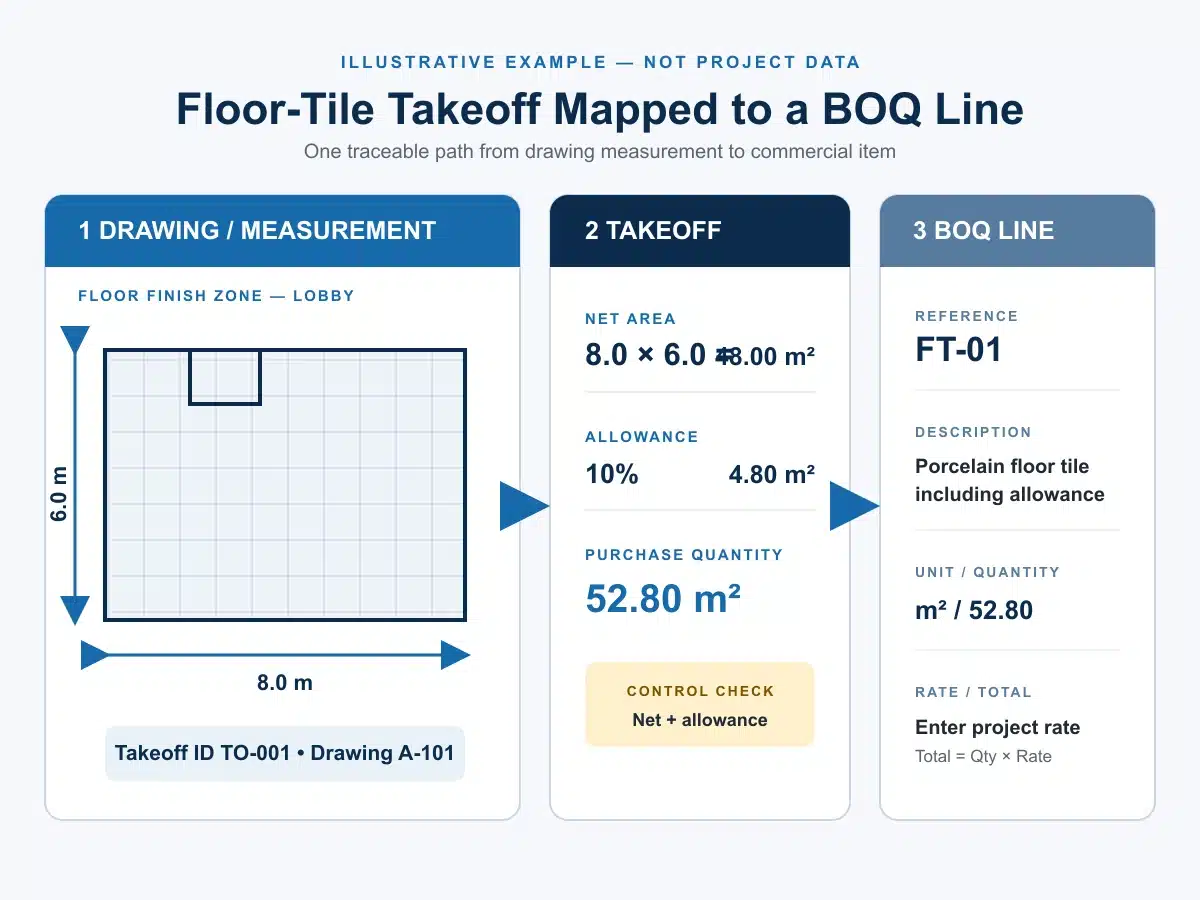
Worked Example: Floor Tile Takeoff to BOQ
The example below is illustrative. It shows the difference between measured quantity, order quantity, and the BOQ pricing item; it does not recommend a universal waste allowance or measurement rule.
| Record | Illustrative entry | Why it matters |
|---|---|---|
| Source | Finish plan FP-201 Rev C and finish schedule FS-01 Rev B | Identifies the documents used for measurement and specification |
| MTO net quantity | T-01 porcelain floor tile: 184.6 m² | Shows the measured design quantity before allowance |
| Allowance | 7.0% approved project assumption | Keeps the assumption visible instead of hiding it in the measured area |
| Purchase quantity | 184.6 × 1.07 = 197.5 m² before carton rounding | Supports procurement while preserving the net quantity |
| BOQ item | Supply and install T-01 porcelain floor tiling, including the inclusions stated in the pricing documents | Defines the priceable scope; quantity and waste treatment follow the project measurement rules |
| Procurement record | Order quantity adjusted to whole cartons after approved product and packing data are known | Prevents a preliminary takeoff assumption from becoming an uncontrolled order |
For custom packages, the fields change with the product. An opening takeoff should retain mark, size, operating type, glazing, finish, and handing for aluminum window and door systems. A joinery schedule should retain room, cabinet or unit references, finish, hardware, and appliance interfaces for custom cabinetry and wardrobes. A fixture schedule should retain model, finish, connection, rough-in, and accessory information for sanitary ware systems.
Fields to Include in Each Document
| Material Takeoff | BOQ |
|---|---|
| MTO item ID | BOQ item number |
| Trade or package | Section or work package |
| Room, zone, level, elevation, or assembly | Location where needed for pricing or administration |
| Drawing, schedule, specification, or model reference and revision | Linked MTO IDs and governing document references |
| Material or element description and type code | Detailed work or supply description |
| Measurement basis, net quantity, and unit | BOQ quantity and unit under the stated measurement rules |
| Allowance and order increment | Pricing basis, rate, amount, and currency |
| Purchase quantity | Inclusions, exclusions, qualifications, and provisional status |
| Assumptions, checker, date, and status | Tender or revision status, bidder response, and commercial notes |
If the project covers many categories, use the whole house building materials checklist to confirm that the takeoff and BOQ have not omitted a room, system, accessory, interface, or handover item.
When to Use a Takeoff, a BOQ, or Both
| Project need | Best starting document | Reason |
|---|---|---|
| Early feasibility or option comparison | Material or quantity takeoff | Measures the physical effect of design options before a formal pricing structure is needed |
| Trade planning or preliminary material order | Material takeoff | Keeps measured quantities, allowances, and package increments visible |
| Competitive tender or bid comparison | BOQ | Gives bidders a shared structure, subject to the complete tender documents |
| Progress valuation or variation assessment | BOQ plus approved change records | Preserves a commercial baseline and item structure |
| Multi-category procurement | Both | Connects source measurements with quotation items, order quantities, and delivery packages |
Who Prepares and Checks the Documents?
There is no universal job title for every project. Estimators, quantity surveyors, cost consultants, contractors, engineers, architects, and trade specialists may prepare or review takeoffs. A formal BOQ is often prepared by a quantity surveyor or cost consultant, but contractor- or package-level BOQs may follow a different responsibility matrix.
The issue sheet should name the measurer, checker, approver, revision, status, and intended use. If a supplier converts a BOQ into a quotation schedule or proposes revised quantities, keep the supplier’s changes separate until the authorized project party accepts them.
For a multi-category inquiry, Skyland’s BOQ and RFQ review service can organize supplied quantities, product schedules, drawings, specifications, inclusions, and missing information for a clearer quotation basis. Certified takeoffs, cost plans, design approval, and local compliance review remain with the appointed project professionals where required.
Common Material Takeoff and BOQ Mistakes
- Treating the documents as identical. This removes the distinction between measurement evidence and pricing structure.
- Hiding waste inside net quantity. Reviewers can no longer tell what was measured and what was allowed.
- Mixing units. Counts, lengths, areas, weights, sets, and packs should not be combined without an explicit conversion.
- Losing source references. A quantity without a current drawing, schedule, model, or calculation reference is hard to verify.
- Pricing incomplete descriptions. Different bidders may assume different finishes, accessories, installation scope, or testing duties.
- Overwriting issued quantities. The team loses the baseline needed to explain a variation or procurement change.
- Using the BOQ as a substitute for drawings and specifications. The documents must be read together under the stated order of precedence.
- Accepting supplier takeoff changes without approval. A commercial proposal should not silently amend the project quantity basis.
How to Use the Free Excel Template
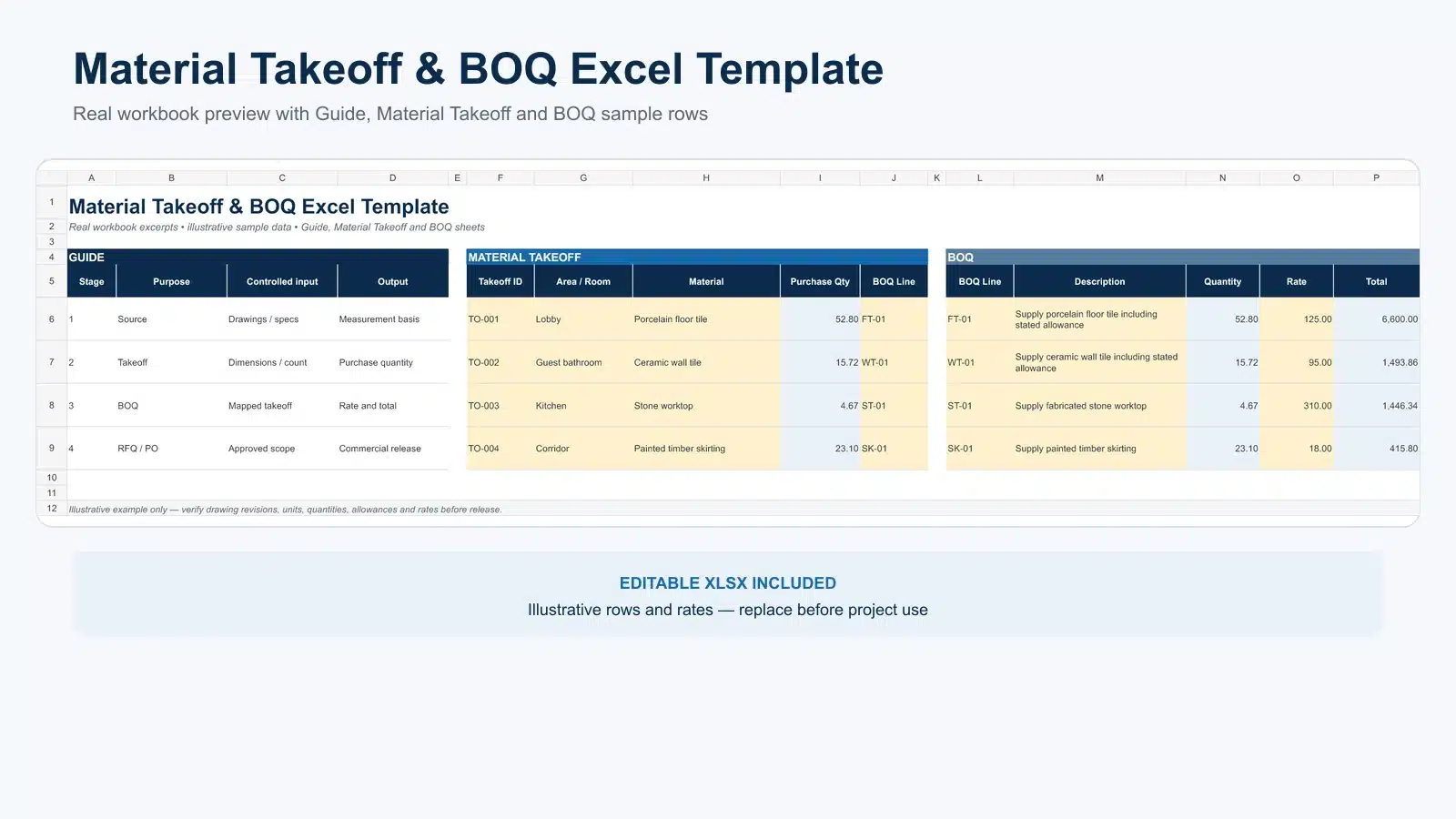
The accompanying workbook has three sheets: a guide and project setup page, a 100-line Material Takeoff register, and a 100-line BOQ schedule. It includes example rows, dropdowns, purchase-quantity formulas, amount formulas, and fields that preserve the link between MTO and BOQ item IDs.
1. Enter project name, reference, measurement basis, currency, preparer, and issue date once on the Guide sheet.
2. Replace the illustrative rows with project data and keep one stable MTO ID for each independently controlled measurement.
3. Record net quantity first. Add an approved allowance and pack or order increment only when the procurement basis is known.
4. Create BOQ items and map them to the relevant MTO ID or IDs. Split items when specification, location, pricing basis, or responsibility differs.
5. Enter rates only after the description, inclusions, exclusions, unit, and currency are clear.
6. Issue a new revision when quantities or descriptions change. Retain the earlier file as the baseline.
Frequently Asked Questions
Is a material takeoff the same as a BOQ?
No. A material takeoff records measured materials or elements and their sources. A BOQ organizes measured work into defined items for pricing and commercial control. A takeoff can provide quantities for a BOQ, but it does not automatically contain the BOQ’s descriptions, pricing rules, or contract structure.
Which comes first, the material takeoff or the BOQ?
The measurement normally comes first, even when the estimator measures directly into a BOQ structure. The project still needs a traceable quantity basis before a priceable item can be relied on.
Does a BOQ include labor and equipment?
It can. A BOQ item may include material, labor, plant, subcontract work, installation, testing, overhead, or other obligations according to its description and the tender rules. Some schedules separate these components; others ask for one composite rate.
Should waste be added to the BOQ quantity?
Follow the stated measurement and pricing rules. Waste may be included in a rate, shown as a separate item, or used only to calculate the purchase quantity. Keep the net measured quantity and any allowance visible so the treatment can be checked.
Can a BIM model produce a BOQ automatically?
A model can generate quantities when objects, classifications, parameters, and revisions are suitable. Those quantities still need checks for scope, model completeness, measurement rules, non-modeled work, specification, grouping, and pricing descriptions before they become a reliable BOQ.
Can a supplier quote from a material takeoff?
Yes, if the takeoff is issued with enough specifications, drawings, quantities, commercial instructions, and scope boundaries. For comparable bids, convert or supplement it with a controlled pricing schedule and require suppliers to identify deviations and exclusions line by line.
Who is responsible if the takeoff and BOQ quantities differ?
Responsibility depends on the contract and document-control matrix. Record the difference, source revision, cause, impact, reviewer, and approval before using the revised quantity for tendering, ordering, valuation, or change control.
Conclusion
The practical difference in material takeoff vs BOQ is the decision each document supports. The takeoff measures and traces physical scope. The BOQ converts that scope into priceable, comparable, and administrable work items. Keep stable IDs, current references, clear units, visible allowances, and revision history as the information moves from one document to the next.
Start with the wider BOQ and Project Planning guide hub. If you are preparing a multi-category quotation, send your BOQ, drawings, or product list for an initial scope review.
Authoritative References Used for Technical Review
- RICS New Rules of Measurement 2 (NRM 2): Detailed Measurement for Building Works — definition, preparation, and use of bills of quantities.
- Autodesk Construction Takeoff — takeoff as measurement of project quantities from design information.