

A practical structure for tracking required submittals, owners, revisions, review dates, response status and release milestones
A shop drawing submittal register is a live control record that lists every required submission and shows who must prepare, check, review, revise and release it. A useful register connects document status to the dates that matter for procurement, fabrication, delivery and installation. It does not replace the contract documents, the approved submittal procedure or the authority of the project’s responsible reviewers.
This guide provides a copyable register structure, a filled example, practical status definitions and a workflow for maintaining the log. It belongs to Skyland Building’s Drawings & Approvals resource hub, where project teams can connect drawing, sample and release records to the exact building material package being reviewed.
Written by Winston
Project Director at Skyland Building · 10+ Years of Building Materials Experience
Updated September 2026 · 19-minute read
Key Takeaways
- Create the register during mobilization or preconstruction, before major material packages are released for procurement.
- Use one stable identifier for each item and keep the revision, response code and overall workflow status in separate fields.
- Work backward from required-on-site, installation or fabrication milestones rather than tracking submission dates in isolation.
- Preserve every formal submission and response. A resubmittal should extend the history, not overwrite it.
- Define what each status permits. A label such as “approved as noted” should never be treated as automatic authority to fabricate unless the project procedure says so.
- Keep shop drawings, product data, samples, calculations and mock-ups distinguishable even when they are issued in one coordinated package.
What a Shop Drawing Submittal Register Controls
The register is a schedule of documents and physical items that require submission, review, acceptance or record during a project. Each row identifies the requirement, the preparing and reviewing parties, the current revision, planned and actual dates, the formal response and the next permitted action. Used consistently, it exposes missing information before it becomes a fabrication or installation delay.
The strongest registers connect a submittal to the downstream activity that depends on it. A required-on-site date is often more useful than a submission date alone because it shows the consequence of a late decision. The register should therefore be managed as part of project planning, not as a separate administrative list.
What the Register Does Not Replace
- The signed construction contract, drawings, specifications and approved project procedures.
- The contractor’s internal coordination and compliance review before formal submission.
- The technical judgement and limited review authority assigned to the architect, engineer, consultant, owner or other named reviewer.
- The document repository that stores the submitted files, mark-ups, calculations, samples, transmittals and responses.
- The change, substitution or RFI process needed when a proposal differs from the governing requirements.
Important: The project contract and approved submittal procedure must define responsibilities, response terms and release authority. The examples below are working controls, not universal contract language.
Shop Drawings, Product Data and Samples
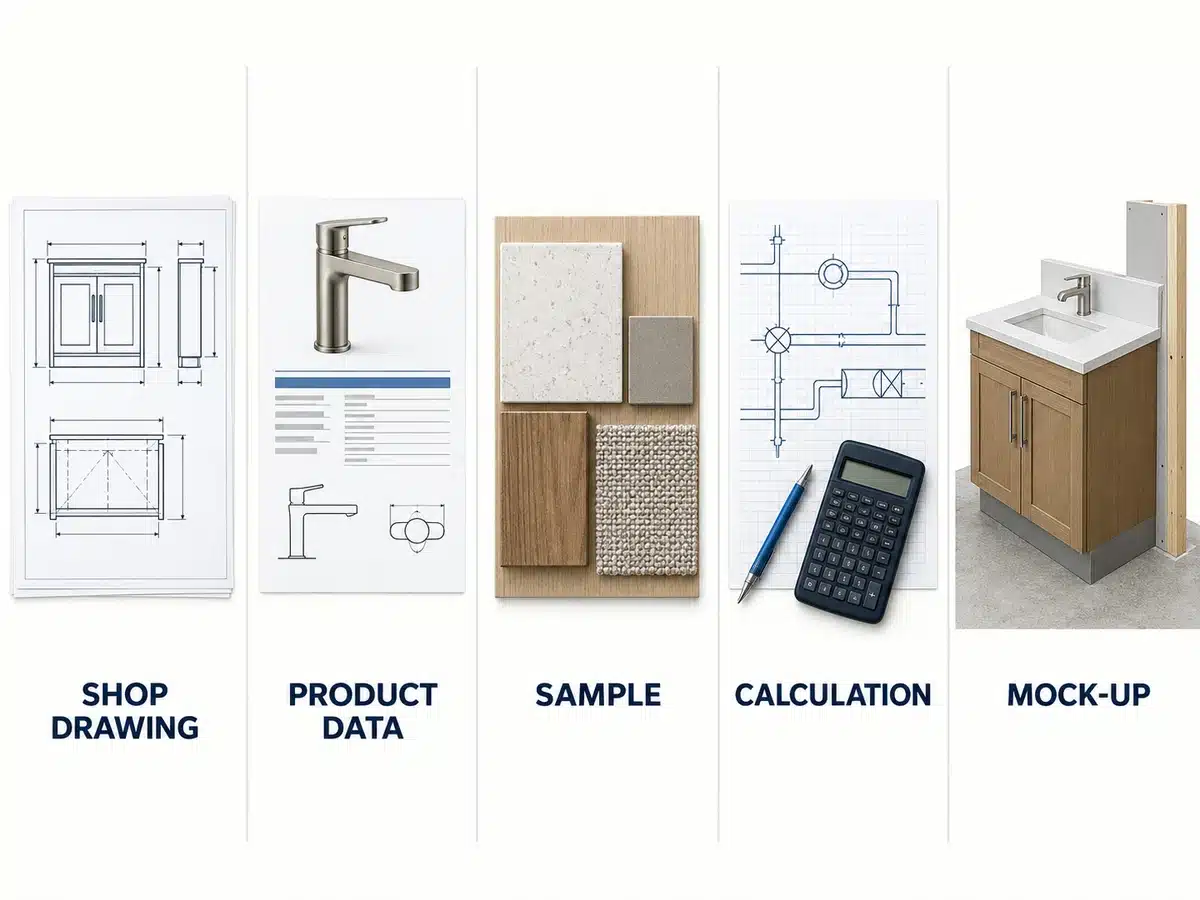
A register may contain several submittal types, but each type answers a different question. Shop drawings show project-specific fabrication or installation information. Product data identifies the proposed manufactured product and its technical information. Samples show defined physical characteristics such as colour, texture or finish. Read the material sample approval process when the record must also connect a physical reference to the product, drawing and approval history.
| Submittal type | Primary purpose | Control point |
|---|---|---|
| Shop drawing | Develop project-specific fabrication, assembly or installation information | Identify source documents, interfaces, revision and declared deviations |
| Product data | Describe the exact proposed product or system | Match model, configuration, performance evidence and intended application |
| Physical sample | Demonstrate defined appearance or material characteristics | State what the sample represents and retain the approved reference where required |
| Calculation or report | Support a defined technical requirement | Confirm author, basis, scope, configuration and review route |
| Mock-up | Demonstrate an assembly, workmanship or appearance at useful scale | Define acceptance criteria, status, retention and whether it becomes a control reference |
Shop Drawing Submittal Register Template Fields
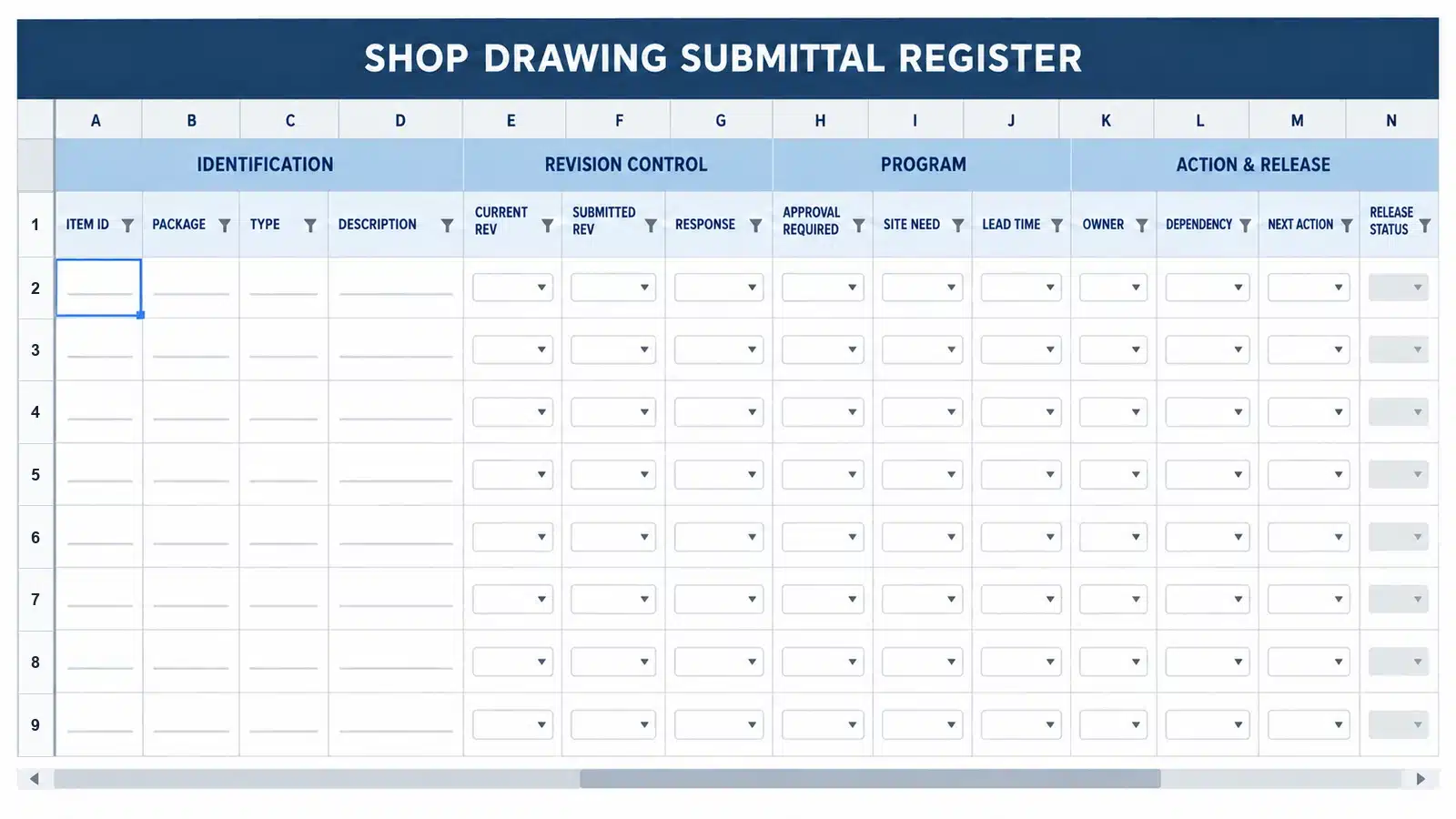
Use the following groups as the core of an Excel, Google Sheets or construction-management register. Start with the fields that support real decisions, then add project-specific columns only where they have a defined owner and purpose.
| Field group | Recommended columns | Why it matters |
|---|---|---|
| Identification | Project code; submittal ID; package or lot; submittal type; discipline; trade | Creates a stable reference across the register, transmittal and file repository |
| Requirement basis | Specification section and clause; drawing or schedule reference; related RFI or instruction | Shows why the item is required and which source revision was used |
| Scope description | System or product; location; drawing marks; quantity or package boundary | Lets reviewers understand the submission without guessing from a file name |
| Responsibility | Preparer; supplier or fabricator; contractor checker; reviewer; final decision authority | Assigns every preparation, review and closure action |
| Planning dates | Required-on-site; installation start; fabrication release; planned submission; response required | Connects review activity to procurement and construction milestones |
| Actual dates | First submission; latest submission; response; resubmission; final release | Shows where time was used and supports an auditable history |
| Revision control | Current revision; purpose of issue; transmittal number; document link; superseded reference | Prevents a response from being applied to the wrong file or revision |
| Review control | Workflow status; reviewer action code; comment reference; next action; action owner; due date | Separates a recorded response from the work still needed to close the item |
| Release control | Permitted action; release date; released by; related sample or calculation; conditions remaining | States whether the exact revision may proceed to reservation, mock-up, fabrication, shipment or installation |
| Risk and notes | Long-lead flag; dependency; days open; schedule risk; concise control note | Makes exceptions visible without replacing the formal review record |
Minimum Viable Register
For a small project, the minimum useful structure is: Submittal ID, type, description, specification or drawing reference, preparer, reviewer, planned submission date, actual submission date, response due date, current revision, formal response, workflow status, next action, action owner and required-on-site date. Do not remove revision and response fields merely to make the sheet shorter.
Download the Shop Drawing Submittal Register Template
Use the editable workbook to track required submittals, owners, revisions, planned and actual dates, review status, next actions, schedule risk and release milestones. It includes dropdown lists, overdue flags, a filled example and a live dashboard.
Download the Excel TemplateXLSX · No email required · Includes dropdowns, formulas, filled examples and dashboard
Filled Example
Illustrative example only. The identifiers, dates and response terms must be replaced with the project’s approved conventions.
| Field | Example value | Field | Example value |
|---|---|---|---|
| Submittal ID | AW-SD-001 | Package | Aluminum window shop drawing package |
| Type | Shop drawing | Location | Typical apartment window openings |
| Requirement basis | Project specification and current opening schedule | Source revision | Architectural issue recorded in the project register |
| Preparer | Window system supplier | Contractor checker | Assigned project engineer |
| Reviewer | Reviewer named in the project procedure | Current revision | R01 |
| Planned submission | 14 September | Actual submission | 15 September |
| Response required | Project-defined date | Formal response | Revise and resubmit |
| Next action | Resolve sill interface comments and issue R02 | Action owner | Supplier with contractor coordination |
| Fabrication release | Not released | Required-on-site | Project schedule milestone |
| Related records | Finish sample and RFI references | Risk | Review delay may affect fabrication start |
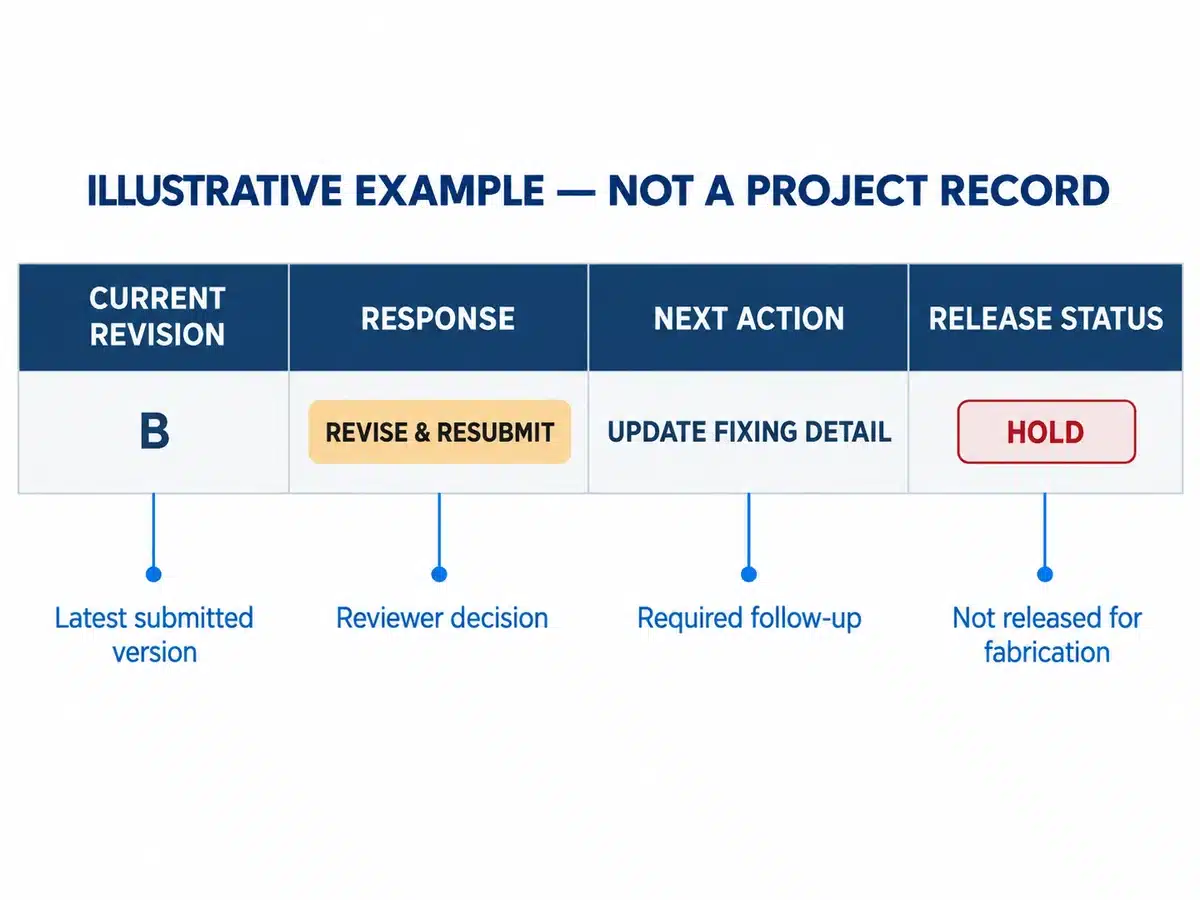
This example separates the reviewer’s formal response from the overall release status. Even after a response is recorded, the row stays open until the required revision is submitted, reviewed and released for the intended action.
Recommended Status and Response Codes
Use two separate fields: workflow status shows where the package is in the process, while response code records the reviewer’s formal action. Do not merge them into one free-text cell.
| Workflow status | Meaning | Required control |
|---|---|---|
| Not started | Requirement identified; preparation has not begun | Confirm owner, source information and planned submission date |
| Preparing | The responsible party is developing the package | Resolve missing inputs and complete internal coordination |
| Internal check | The contractor or assigned checker is reviewing before submission | Confirm completeness, interfaces, deviations and current source revisions |
| Submitted | The controlled transmittal has been issued | Record revision, actual submission date and response due date |
| Under review | The named reviewer is assessing the package | Track review age and any request for additional information |
| Returned for revision | A formal response requires changes or clarification | Assign every comment, revise, respond and resubmit |
| Approved with comments | A formal response includes conditions or corrections | Apply the project’s release rule; classify blocking and non-blocking comments |
| Approved or accepted | The response contains no outstanding review action for the defined purpose | Confirm the exact revision and the downstream action the contract permits |
| Rejected or not approved | The proposal does not meet the review requirements | Do not proceed with affected work; correct the basis of submission |
| Superseded | A later revision or instruction has replaced this record | Retain the history and remove the superseded file from active use |
Projects use different response stamps and codes. Define each code in the project procedure and connect it to a permitted action. “Approved as noted,” “reviewed,” “no exceptions taken,” and similar terms must not be given a universal meaning.
Who Creates and Maintains the Register
The contractor or construction manager commonly establishes the master register from the contract requirements. Subcontractors, suppliers and fabricators then confirm their package-level requirements and planned dates. A document controller or project engineer may maintain the record, but administrative updating does not transfer responsibility for the technical content.
| Party | Typical register role | Boundary to keep clear |
|---|---|---|
| Contractor or construction manager | Establishes the master register, confirms the review route, checks coordination and controls distribution | Field verification, trade coordination, sequencing and contractual obligations remain explicit |
| Subcontractor, supplier or fabricator | Prepares package information, identifies required inputs and responds to comments | Product-specific accuracy, feasibility, tolerances and consistency with the released revision |
| Architect, engineer, consultant or owner reviewer | Takes the action assigned by the contract and project procedure | Review scope, authority and liability follow the applicable agreements and law |
| Document controller | Registers, routes, timestamps, archives and reports the current status | Does not make technical or contractual decisions unless separately authorized |
| Procurement and site teams | Use approved information for purchase, production, delivery and installation planning | Must verify the exact released revision and any remaining conditions before acting |
How to Build the Register
- Extract every requirement. Read the submittal paragraphs in each relevant specification section, then check execution, quality assurance, testing, commissioning and closeout requirements. Compare the extracted list with drawings, schedules, equipment lists and trade scopes.
- Create stable identifiers. Use a naming convention that links the project, discipline or specification section, item number and revision. Apply the same identifier to the register row, transmittal, file name and review response.
- Describe the real package. Replace vague names such as “doors” or “metalwork” with the system, location, mark, package boundary and intended decision.
- Assign the route and owners. Name the preparer, internal checker, formal reviewer, decision authority and the person who must close comments. State whether multi-discipline reviews are parallel or sequential.
- Plan dates backward. Start with installation, delivery or fabrication need dates. Allow time for preparation, internal review, formal review, comment resolution, resubmission, procurement, production, inspection and logistics where applicable.
- Publish controlled definitions. Place the status glossary, response codes, permitted actions and update responsibilities beside the register so the whole team applies the same logic.
- Test the draft with the trades. Ask each responsible trade to confirm completeness, realistic submission dates and dependencies before the baseline register is accepted.
Connect the Register to the Procurement Schedule
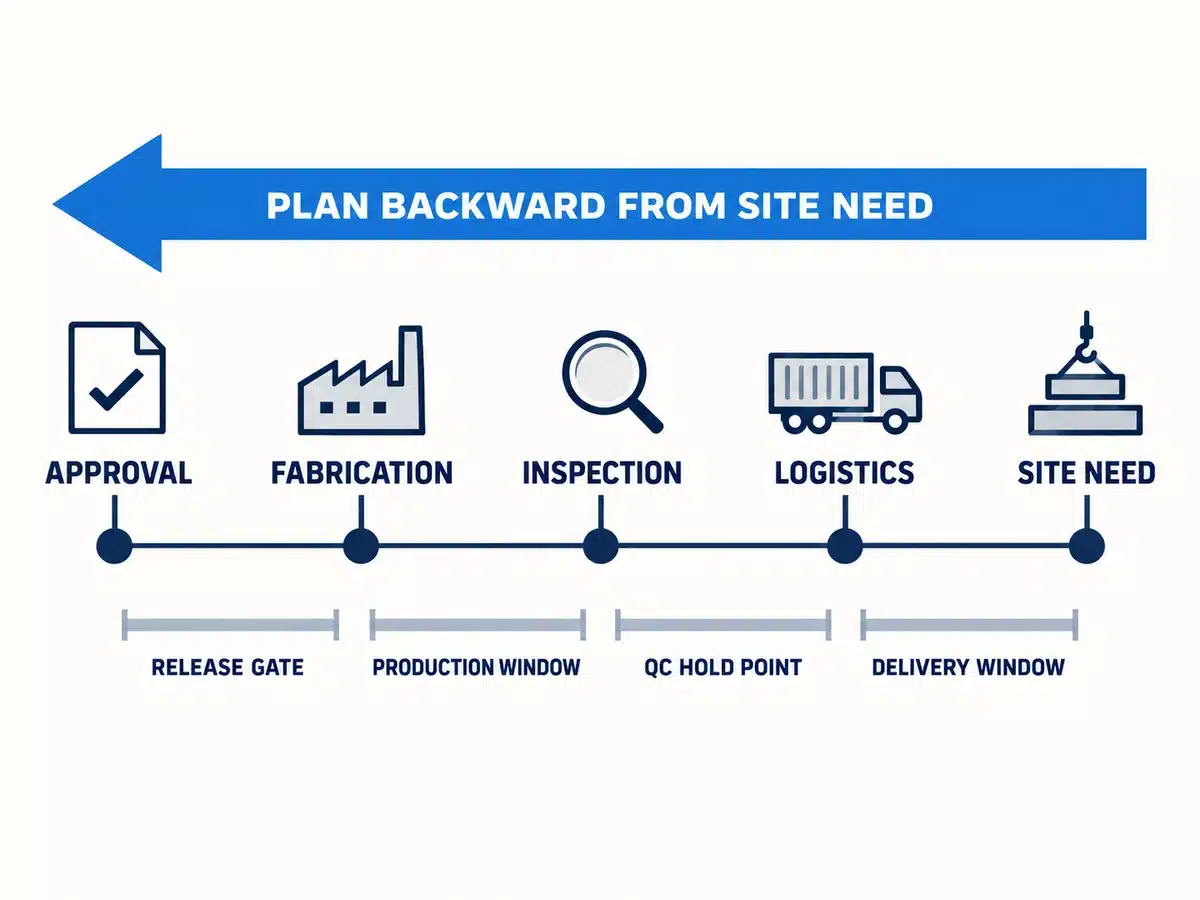
A submission date has little planning value unless it is connected to the activity that depends on approval. Use the construction procurement schedule guide to align drawing and sample approvals with production, inspection, shipping and required-on-site milestones.
| Backward-planning point | What it controls | Dependency to record |
|---|---|---|
| Required-on-site or installation date | The material must be available for the planned site sequence | Site access, storage and predecessor work |
| Delivery and logistics allowance | Transit, consolidation, customs and receiving where applicable | Route, destination and handling requirements |
| Inspection and packing allowance | Agreed checks, corrective action and protective packing | Inspection scope and release records |
| Manufacturing or fabrication period | Product-specific production lead time after release | Capacity, approved information and material availability |
| Drawing and sample approval window | Preparation, internal review, formal review and resubmission cycles | Project-defined review durations and decision owners |
| Information need date | Latest date for missing design information, RFI or field verification | Current source revisions and responsible party |
Do not assume one standard review duration or manufacturing lead time. Use the periods stated in the contract and confirmed for the selected supplier, product configuration and project conditions. If an approval depends on a sample, RFI or field measurement, record that dependency instead of presenting a false standalone deadline.
Manage the Submission and Resubmission Workflow
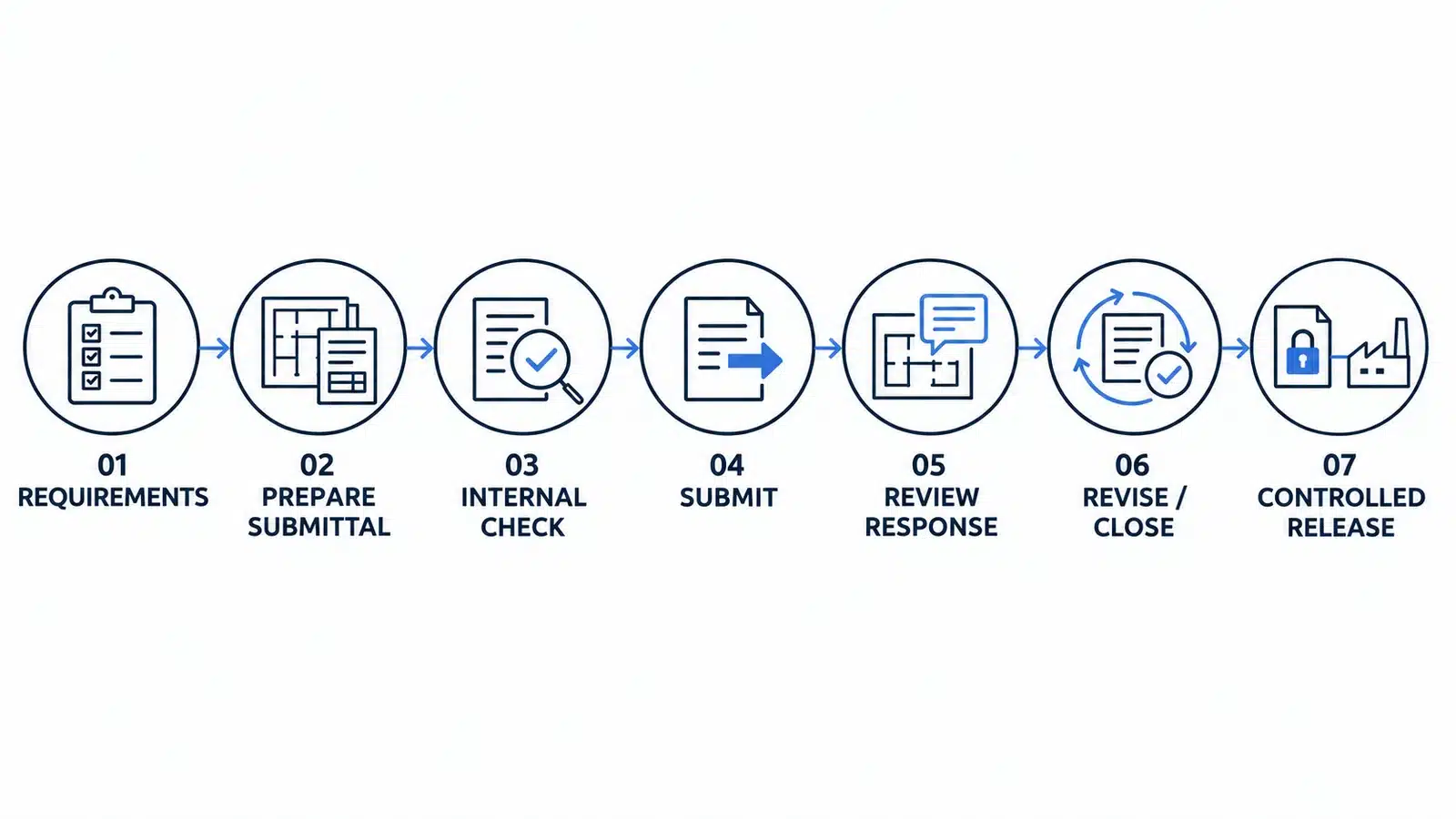
Prepare and Check Before Formal Submission
The preparing trade should check dimensions, interfaces, materials, finishes, specifications, current design information and known site conditions. The contractor’s internal review should resolve coordination issues and identify deviations before the package reaches the formal reviewer. The detailed shop drawing approval process explains the distinction between preparation, contractor checking, defined professional review and final release.
Transmit One Controlled Package
The transmittal should identify the project, submittal number, specification section, drawing numbers, revision, purpose of issue, requested action, response due date, related items and any declared deviation. Avoid parallel email copies that make the official file or response route unclear.
Record Comments Without Replacing the Review Record
Use the register to point to the formal mark-up or comment-response matrix. Record the response code, response date, reviewer, comment reference, owner and next action, but retain the complete reviewed document in the controlled repository. A short register note should not become the only evidence of a technical decision.
Preserve the Resubmittal History
Keep the original submission and response. Add each resubmission as a linked revision or event, record the comments addressed, identify new or outstanding issues and connect the response to the exact revised document. Never overwrite the original submission date merely to make the current row appear complete.
Confirm the Release Gate
Before procurement, fabrication, shipment or installation, verify that the recorded response applies to the current revision, location, quantity, finish and interface conditions. Confirm that related samples, calculations, RFIs and formal changes are closed or covered by an explicit project instruction. Withdraw superseded copies from procurement, factory and site use.
Set Up the Template in Excel or Google Sheets
A spreadsheet is suitable when the number of submittals is manageable, one team controls the master register and documents are stored in a separate controlled repository. Protect formula and formal-response columns, limit edit permissions and publish dated read-only reports for wider distribution.
- Filters: discipline, trade, preparer, reviewer, specification section, workflow status, response code, risk and required-on-site period.
- Calculated controls: days in current status, days to response due, days to required-on-site and review-cycle count.
- Conditional formatting: overdue actions, blank owners, missing source revisions, responses applied to superseded files and unreleased long-lead packages.
- Validation lists: submittal type, status, response code, risk level and permitted action.
- Protected fields: stable identifiers, formal response, reviewer, response date, released revision and document link.
- Saved views: items awaiting internal check, items under review, overdue actions, long-lead packages and approvals required within the next reporting period.
A blank date should remain visibly blank. Avoid formulas that replace missing information with zero, “on time” or another reassuring value. Every warning rule should have a named action owner and a clear definition.
When Construction Management Software Is More Practical
A dedicated platform becomes useful when many organizations submit documents, reviews run in parallel, permissions differ by role or the project needs reminders, audit history and centralized attachments. The software should support the approved process; it cannot determine whether the technical content satisfies the contract.
How the Register Supports Custom Material Packages
Custom building materials often require drawings, samples, product data and interface information to move together. Use the same item or location reference across the register, quotation, approved drawing, production record, inspection record and package label.
For aluminum window systems, the drawing record may need to connect opening marks, frame configuration, glass, hardware, drainage, perimeter interfaces and finish samples. For kitchen cabinet packages, it may connect room or cabinet marks, appliance data, service points, worktops, internal fittings, material samples and hardware schedules. For structural glass facades, it may need coordinated elevations, module grids, glass and framing, anchors, movement, drainage, calculations, mock-ups and project-specific test information.
These examples show why a single generic description is insufficient. The register should identify the exact product, system, location and supporting records being reviewed. Final design, engineering, code compliance and site installation remain with the parties assigned by the contract and applicable law.
Best Practices for Keeping the Register Accurate

- Review changed, overdue, recently returned and upcoming items as a standing coordination-meeting agenda item.
- Keep one controlled master register and create filtered views for each trade, reviewer or meeting rather than separate competing copies.
- Use consistent identifiers and revision conventions across the register, transmittal, file name, response and repository.
- Separate overdue, aging and risk flags. An item can be old without being late, or late without threatening the current site sequence.
- Audit released submittals against current architectural, structural and services information before fabrication and again before installation.
- Record concise next actions with one owner and one date. Avoid status notes that merely repeat “follow up.”
- Retain previous responses, superseded files and the reasons for a changed approval basis.
Common Register Mistakes
| Mistake | Why it causes problems | Better control |
|---|---|---|
| Building the list from memory | Samples, calculations, testing, warranties or closeout records are missed | Extract requirements from specifications, drawings, schedules and trade scopes |
| Using vague descriptions | Reviewers cannot identify the system, location or decision requested | Add package boundaries, marks, locations and source references |
| Treating submitted as approved | Procurement or fabrication may start without a valid release | Separate workflow status, formal response and permitted action |
| Overwriting resubmissions | The review history and cause of delay disappear | Retain each submission, response and revision as linked events |
| Ignoring long-lead dates | A technically complete log fails to protect the delivery schedule | Work backward from required-on-site and record every dependency |
| Using unrestricted shared copies | Different parties edit competing versions or formal fields | Control permissions, protect fields and issue dated reports |
| Applying a generic status glossary | Teams assume a response permits more than the contract allows | Use project-approved codes and release rules |
| Closing items with open conditions | Blocking comments, samples or RFIs remain unresolved | List every condition, owner and next action before closure |
How Skyland Can Support the Supplier-Side Record
Skyland Building’s Drawing & Sample Coordination service can help organize available shop drawings, finish references, physical samples, revision comments and supplier-side release information across selected material categories. The service does not replace the design review, code decisions, field verification or professional responsibilities assigned to other project parties.
To begin a project-specific review, send your drawings, BOQ, schedules and product list. Include the project location, current document revisions, required material categories, target delivery period and any known approval deadlines.
Conclusion
A shop drawing submittal register becomes useful when it connects requirements, accountable people, current revisions, formal responses and the downstream decisions that depend on them. Build it before procurement accelerates, preserve the full review history and manage exceptions as part of normal project coordination.
The template should remain simple enough to update and detailed enough to answer five questions at any time: What is required? Which revision is current? Who must act? When is the decision needed? What action is actually permitted after the response?
Frequently Asked Questions
What is a shop drawing submittal register?
It is a controlled list of required project submittals with their identifiers, source references, owners, planned and actual dates, revisions, responses, workflow status and release information.
When should the register be created?
Create the first version during preconstruction or mobilization, before major procurement and fabrication decisions. Refine it as trade scopes, source information and project sequencing become clearer.
Who should maintain the master register?
The contract should assign responsibility. A contractor, construction manager, project engineer or document controller commonly maintains the master record, while suppliers and trades provide package-level information.
What is the difference between a submittal log and a submittal register?
Many teams use the terms interchangeably. If a project distinguishes them, a register may identify all required submissions while a log records actual transactions. Follow the terminology defined in the project procedure.
Should resubmittals replace the original entry?
No. Retain the original submission and response, then record each resubmittal as a linked revision or event. This preserves what changed, when it changed and which comments remain open.
Can fabrication start after approved as noted?
Only if the project’s contract and status definition permit that exact action and no comment blocks it. Obtain formal clarification when the consequence of the response is unclear.
How often should the register be updated?
Update it when a requirement, submission, response, revision, dependency or release decision changes. Review exceptions at every relevant coordination meeting and issue dated reports at the agreed reporting frequency.
When is a spreadsheet no longer enough?
A dedicated system may be more practical when many organizations submit and review documents, approvals run in parallel or the project requires granular permissions, reminders, centralized files and a detailed audit history.
References and Contract Note
The following U.S. Army Corps of Engineers materials provide examples of formal submittal-register and transmittal controls. They are not universal standards and should not be copied into another project without checking the signed contract, specifications, jurisdiction and approved procedures.
- USACE ENG Form 4288 Submittal Register — A current example of a structured submittal register form dated June 2024.
- USACE ENG Form 4025 R Transmittal of Shop Drawings Equipment Data Material Samples or Manufacturer Certificates of Compliance — Shows a formal transmittal structure, submittal categories and resubmittal identification in the USACE context.
- USACE UFGS 01 33 00 Submittal Procedures — An example procedure linking the initial submittal register and subsequent status updates to project controls.