
A practical guide to converting controlled design information into measurable, quotable, and traceable material packages.
A BOQ in construction is a structured bill of measured work. It usually includes item descriptions, quantities, units, and pricing fields so tenderers can price the same defined scope. For building material procurement, selected BOQ data can also be adapted into a controlled schedule for supplier quotations, order quantities, approvals, packing, delivery, and change tracking.
The distinction matters. A formal bill of quantities may have a defined role under the tender or contract, while a supplier-facing procurement schedule is an operational document derived from approved project information. Renaming a spreadsheet as a BOQ does not give it contractual status, and adding procurement fields does not replace the measurement rules, drawings, specifications, or approvals required by the project.
This guide explains what a construction BOQ should contain, who normally prepares and checks it, how to convert measured quantities into purchasable quantities, and how to use the same item references through quotation, production, inspection, and delivery. It is general procurement guidance, not project-specific quantity surveying, engineering, legal, or code advice.
Written by Winston
Project Director at Skyland Building · 10+ Years of Building Materials Experience
Updated August 2026 · 15-minute read
Key Takeaways
- Treat the formal BOQ and the supplier procurement schedule as related but distinct documents; their authority depends on the project contract and document-control rules.
- Use one stable item ID and link it to the applicable drawing, schedule, specification, sample, submittal, or approved instruction.
- Keep net measured quantity, approved allowance, pack or fabrication rounding, and final order quantity in separate fields.
- Issue every bidder the same controlled inquiry package and require deviations, exclusions, alternatives, and assumptions to be identified line by line.
- Do not release custom products from quantities alone; confirmed dimensions, interfaces, shop drawings, samples, finishes, hardware, and approvals may still be required.
- Preserve the baseline and record authorized changes instead of overwriting earlier quantities or quotation assumptions.
What Is a BOQ in Construction?
BOQ stands for bill of quantities. RICS NRM 2, 2nd edition, describes standard rules for the detailed measurement and description of building works to support bills of quantities and quantified schedules of work. A formal BOQ normally organizes measurable work into consistent descriptions, quantities, units, and pricing fields. Depending on the procurement route and contract, it may also contain preliminaries, contractor-designed work, provisional sums, risks, credits, and pricing summaries.
The applicable measurement rules must be stated. RICS NRM 2 is one framework, but a project may use another national standard, a client standard, or project-specific rules. The document should identify the edition, amendments, units, rounding conventions, and information on which the measurement is based.
Formal BOQ vs. Supplier Procurement Schedule
| Document | Primary purpose | Important control |
| Formal BOQ | Describe and measure building work for tendering, pricing, and other uses defined by the contract. | Follow the stated measurement rules, document precedence, issue status, and contractual terms. |
| Supplier procurement schedule | Translate approved package data into comparable quotations, order quantities, approvals, packing, delivery, and reconciliation fields. | Keep the source BOQ or takeoff reference; do not imply that procurement edits amend the contract BOQ. |
For a multi-category package, the procurement schedule may be the more practical day-to-day register. It should remain traceable to the formal BOQ, takeoff, drawings, schedules, and approved changes from which its quantities and specifications were derived.
What a Construction BOQ Does – and Does Not Do
A well-prepared BOQ can support tender comparison, budgeting, work-package procurement, cost reporting, valuation, and change control. It gives the project team a common item reference and makes omissions or scope differences easier to identify.
It does not replace architectural or engineering drawings, specifications, structural calculations, equipment schedules, approved submittals, local compliance review, installation instructions, or the contract. If project documents conflict, the contract should define their precedence and the process for resolving discrepancies.
BOQ vs. Estimate, Material Takeoff, BOM, and Material Schedule
| Document | Primary purpose | Typical content |
| BOQ | Describe and price measured construction work | Item descriptions, quantities, units, rates, amounts, references, and pricing rules |
| Estimate | Forecast probable project cost | Assumptions, quantities, market or benchmark rates, allowances, risks, and totals |
| Material takeoff | Measure quantities from design information | Counts, lengths, areas, volumes, weights, and source references |
| BOM | List components needed to manufacture an assembly | Part numbers, components, subcomponents, and production quantities |
| Material schedule | Define selected products by type, location, or finish | Product codes, performance, sizes, finishes, locations, and approval status |
These documents can be linked but should not be treated as interchangeable. A material takeoff may supply the net quantity, a material schedule may define finish and performance, and the BOQ may combine those inputs into a measurable item. For a custom cabinet, window, staircase, or stone package, the manufacturing BOM and approved shop drawings may contain fabrication detail that should not be forced into the tender BOQ.
Who Prepares and Checks the BOQ?
Responsibility depends on the project and contract. A quantity surveyor or cost consultant commonly prepares a client-side tender BOQ. Under design-build, contractor-led, or smaller private projects, an estimator, commercial manager, engineer, architect, or specialist consultant may prepare all or part of it. The document should identify who prepared, checked, approved, issued, and revised it.
- The design team defines design intent, technical requirements, interfaces, and applicable standards within its appointed scope.
- The quantity surveyor, estimator, or assigned measurer quantifies items using the agreed documents and measurement rules.
- The procurement team packages the scope, issues the RFQ, compares quotations, and records commercial assumptions and clarifications.
- The supplier confirms its quotation scope, purchasable units, pack sizes, accessories, exclusions, production requirements, and lead-time basis.
- The authorized project representative approves quantities, substitutions, samples, drawings, releases, and changes under the contract.
Responsibility boundary
A supplier review can improve procurement accuracy, but it does not automatically transfer responsibility for design quantities, interfaces, code compliance, or project approvals. Any transfer of responsibility must be explicit in the contract and accepted by a competent, authorized party.
Information Needed Before Preparing a BOQ
Quantity accuracy depends on the status and coordination of the source information. Start with a current document register and confirm that drawings, schedules, specifications, and revisions belong to the same issue. If information is incomplete, label the item as provisional or estimated, state the assumption, and identify what must be resolved.
- Architectural plans, elevations, sections, details, and room or finish schedules
- Structural drawings, calculations, reinforcement schedules, and connection details where relevant
- Door, window, hardware, sanitary ware, lighting, equipment, and joinery schedules
- MEP layouts and builder-work information that affect openings, cabinets, ceilings, fixtures, and finishes
- Project specifications, performance criteria, approved samples, and applicable document revisions
- Scope boundaries for supply, delivery, installation, testing, protection, commissioning, spares, and handover
- The selected method of measurement or project-specific measurement rules, including units and amendments

How to Prepare a BOQ for Building Material Procurement
1. Define the Scope and Package Boundaries
State whether each item covers supply only, supply and delivery, installation, testing, protection, commissioning, spares, documentation, or another service. Identify owner-supplied, contractor-supplied, locally sourced, and supplier-designed elements so the same work is not omitted or counted twice.
2. Select the Measurement Basis
Name the required measurement method, edition, units, rounding rules, and project amendments. Do not mix net area, gross area, pieces, sets, cartons, stock lengths, or weight without showing how one unit converts to another.
3. Create Stable Item Codes
Give every line a persistent ID that can be reused in RFQs, quotation clarifications, purchase orders, approved submittals, packing lists, delivery inspections, and change records. Add new codes when the scope expands; do not renumber the full register and break earlier references.
4. Write a Measurable Description
Describe what the item is, where it is used, and which requirements affect pricing. Include size, material, finish, performance, accessories, interfaces, fixing responsibility, and source references where relevant. Avoid copying marketing language that cannot be measured or verified.
5. Measure the Net Design Quantity
Measure from the controlled documents and retain the calculation, takeoff, or model reference. Keep the design quantity separate from allowances, supplier pack conversions, minimum-order effects, and commercial rounding.
6. Convert Net Quantity into Order Quantity
Add only an approved, item-specific allowance for cutting, matching, laps, fabrication, breakage, testing, replacement stock, or spares. Then convert and round to the actual purchasable unit, such as full cartons, slabs, stock lengths, sets, or production batches. Preserve the calculation rather than replacing the net quantity.
7. Add Commercial, Approval, and Delivery Fields
Record currency, rate basis, tax treatment, delivery term or freight basis, quotation validity, payment basis, approval requirements, lead-time trigger, required-on-site date, delivery phase, storage constraints, and exclusions. These fields make supplier offers comparable and connect purchasing to the construction schedule.
8. Review, Approve, and Issue a Controlled Revision
Check quantities, descriptions, references, interfaces, conversions, formulas, and package completeness. Record open questions and provisional items. Issue the BOQ with a revision, date, status, preparer, checker, and approver, then withdraw or clearly mark superseded versions.

Essential Construction BOQ Template Fields
The following groups can be used in Excel, Google Sheets, estimating software, or a project database. Keep measurement, technical, commercial, and control information visible; do not hide critical assumptions only in emails or chat records.
| Field group | Recommended fields | Control purpose |
| Document control | Project, package, title, revision, status, issue date, prepared by, checked by, approved by | Shows which issue is authorized for use |
| Item identity | Item ID, work package, trade, building, level, room, zone, or type mark | Maintains traceability across quotation, order, packing, delivery, and change records |
| Technical description | Product or work description, size, material, finish, performance, accessories, approved-equivalent rules | Defines what suppliers must price and provide |
| Source references | Drawing and revision, schedule code, specification section, sample, submittal, or instruction reference | Links each item to controlled project information |
| Quantity | Unit, net quantity, takeoff reference, allowance type and basis, conversion, rounded order quantity | Separates measured scope from purchasable quantity |
| Commercial | Supplier, quote reference, currency, rate, amount, tax, freight or delivery basis, validity, exclusions | Supports like-for-like quotation comparison |
| Programme and approval | Decision required by, sample and drawing status, lead-time trigger, required-on-site date, batch or phase | Links procurement to approvals and site sequence |
| Order and delivery | PO, ordered, packed, shipped, delivered, accepted, damaged, rejected, replaced, and remaining quantities | Supports reconciliation and shortage control |
| Change control | Baseline, revised quantity, change reference, reason, cost and programme effect, approval status, responsible party | Preserves the original basis and authorized movement |
Blank BOQ Template Layout
Use one row per measurable item. If the register becomes too wide, keep one stable item ID and split the data into linked Technical and Quantity, Commercial and Approval, and Delivery and Change views instead of manually duplicating the same item.
| Item ID | Package | Description / specification | Location | Unit | Net qty. | Drawing / rev. |
| [ ] | [ ] | [ ] | [ ] | [ ] | [ ] | [ ] |
Template A – technical and measured quantity fields
| Allowance / basis | Order qty. | Supplier / quote | Currency / rate | Approval / lead-time basis | Required on site | Status / PO |
| [ ] | [ ] | [ ] | [ ] | [ ] | [ ] | [ ] |
Template B – procurement and delivery-control fields

Net Quantity vs. Order Quantity
One of the most important controls in a building materials BOQ is the separation of measured scope from the quantity actually purchased.
- Net quantity: the quantity measured from the controlled design using the stated measurement rules.
- Procurement allowance: an approved, item-specific provision for cutting, pattern matching, laps, fabrication, breakage, testing, replacement stock, or spares.
- Order quantity: the net quantity plus the approved allowance, converted and rounded to the supplier’s purchasable unit.
- Reconciled quantity: the quantity later recorded as packed, shipped, delivered, accepted, installed, or remaining, depending on the control point.
Do not apply one universal waste percentage to every category. Tiles, natural stone, flooring, profiles, glass, cabinetry panels, sanitary sets, and custom windows have different layout, fabrication, packaging, installation, and replacement risks. The project team should approve the allowance basis for each relevant item.
For custom products, arithmetic is only one release condition. Final order quantities may also depend on verified site dimensions, approved shop drawings, opening schedules, hardware sets, plumbing and electrical points, finished-floor levels, installation tolerances, and agreed interfaces.
From BOQ to Supplier RFQ and Quotation Comparison
A BOQ in construction becomes useful for procurement only when every bidder receives the same controlled information and returns prices in a comparable format. The BOQ provides the itemized scope; the RFQ provides the inquiry instructions, return requirements, commercial basis, and clarification process.
Issue One Controlled Inquiry Package
Issue the BOQ together with current drawings, specifications, schedules, material or finish references, required standards, destination, delivery phases, requested documents, and quotation return instructions. Record the issue date and revision so later clarifications do not become detached from the priced package.
Normalize Technical and Commercial Scope
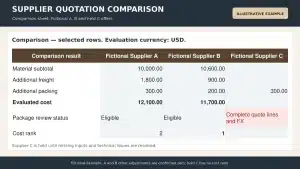
Require suppliers to identify exclusions, deviations, proposed alternatives, missing accessories, minimum-order effects, and unit conversions line by line. Compare compliant base offers on the same quantities, units, currency, tax basis, delivery basis, testing, samples, shop drawings, packing, inspection, spares, and service scope. Keep alternatives separate until the design and commercial teams approve them.
Record Release Conditions and Lead-Time Triggers
For custom or imported materials, record when production lead time begins – for example, after deposit, final drawing approval, sample approval, verified dimensions, or another agreed release condition. Also record consolidation requirements, export packing, inspection points, shipping documents, unloading assumptions, and required-on-site dates.

BOQ Procurement Checklist Before Placing an Order
- The BOQ revision and status are current, approved, and consistent with the drawing and specification register.
- Every item has a stable ID, clear description, location or package, unit, net quantity, and source reference.
- Scope boundaries identify supply, delivery, installation, testing, protection, spares, documentation, and exclusions.
- Net quantity, allowance, unit conversion, pack rounding, and order quantity are shown separately.
- Provisional or estimated quantities show the assumption, missing information, responsible party, target resolution date, and approval status.
- Custom products have the required site dimensions, shop drawings, samples, finish codes, hardware or accessory schedules, and interface approvals.
- Supplier deviations, alternatives, missing accessories, minimum-order effects, and exclusions have been reviewed and resolved.
- Quotation currency, tax basis, validity, delivery basis, payment basis, and lead-time trigger are recorded.
- Production, inspection, packing, shipment, delivery, storage, and installation milestones align with the project schedule.
- The purchase order references the approved BOQ or procurement-schedule revision and the applicable controlled technical documents.
- Receiving records can reconcile ordered, packed, shipped, delivered, accepted, damaged, rejected, replaced, and remaining quantities.
- Any post-release change uses an authorized change reference instead of overwriting the baseline.
Common BOQ Mistakes to Avoid
Generic Descriptions
Labels such as doors, tiles, or bathroom fixtures do not define sizes, locations, finishes, performance, accessories, or interfaces. They produce incomparable quotations and leave important scope open to interpretation.
Mixing Measurement and Purchasing Units
A finish may be measured by area but purchased by carton; a profile may be measured by length but ordered in stock lengths. Show both units, the conversion formula, and the rounding result.
Hiding Incomplete Information
Do not present an unsupported quantity as final. Mark it as provisional or estimated, state the basis, identify the missing decision, and prevent release until the required approval is recorded.
Using One Allowance for Every Material
Allowances should reflect the item, layout, fabrication method, pack size, handling plan, installation method, replacement risk, and approved spare strategy.
Comparing Unit Prices Without Normalizing Scope
Freight, taxes, accessories, testing, samples, shop drawings, packing, inspections, spares, and installation support can materially change the total offer.
Ordering Custom Products from Quantities Alone
A BOQ may establish count and scope, but fabrication should not start until the required dimensions, interfaces, drawings, finishes, hardware, and approvals are controlled.
Overwriting Previous Quantities
Preserve the baseline, revised quantity, reason, change reference, approval, and impact. Revision history is needed to explain cost, programme, and delivery changes.

How to Control the BOQ During Construction
Update the construction BOQ or procurement schedule only through the project’s approved document and change-control process. Record the source of each change, previous and revised quantity, responsible party, technical approval, commercial effect, programme effect, and issue status. Keep superseded versions retrievable but clearly marked.
Reconcile active material packages against purchase orders, supplier packing lists, shipment records, site receipts, inspection results, accepted quantities, installed quantities, and remaining stock. Use the same item IDs so shortages, damage, substitutions, and phased deliveries can be traced without relying on product names alone.
At closeout, retain the final quantity record with approved changes and the relevant as-built information, purchase and delivery records, inspection evidence, warranties, manuals, spares, and remaining stock information. The final record should describe what was authorized, supplied, and accepted, not only what was originally tendered.
How Skyland Supports Coordinated Quotations from a BOQ
For a villa, apartment, hotel, or commercial project, Skyland can review an available BOQ together with drawings, schedules, material preferences, destination information, and delivery phases to help structure a coordinated quotation across the confirmed product categories. The review can identify missing specifications, unclear package boundaries, incompatible units, quotation gaps, or custom items that still require samples, drawings, or verified dimensions.
The appointed project team should retain responsibility for design, quantities, local compliance, document precedence, and approvals according to the contract. Skyland’s quotation scope and technical responsibilities should be stated for each package rather than assumed from a general service description.
Prepare a coordinated quotation package
Share the current BOQ or material schedule, drawing register, relevant drawings and specifications, project location, delivery phases, and list of open decisions. Any quotation remains subject to confirmed scope, technical review, and the approvals required for the project.
Frequently Asked Questions
What Does BOQ Stand for in Construction?
BOQ stands for bill of quantities. It is a structured document that describes measured construction items, quantities, units, and commonly the pricing fields used for tendering, valuation, or procurement under the project’s chosen rules.
Is a Construction BOQ the Same as a Material Takeoff?
No. A material takeoff focuses on measured quantities from design information. A BOQ adds structured descriptions, units, pricing fields, references, and commercial rules, and it may contain work items beyond materials.
Who Prepares a BOQ in Construction?
It depends on the procurement route and contract. A quantity surveyor or cost consultant often prepares a formal tender BOQ, while a contractor, estimator, engineer, architect, or specialist consultant may prepare all or part of it under other arrangements.
Can a Supplier Prepare the BOQ?
A supplier may prepare or refine a schedule for its own package and can confirm pack sizes, sets, accessories, fabrication requirements, minimum orders, and quotation scope. Responsibility for design quantities, interfaces, and compliance should not be transferred unless the contract expressly assigns it.
How Much Waste Should Be Added to BOQ Quantities?
There is no universal percentage. The allowance depends on the material, layout, dimensions, cutting, pattern matching, fabrication, packaging, installation, handling, replacement risk, and spare requirements. Record the item-specific basis and approval.
Can a BOQ Be Managed in Excel or Google Sheets?
Yes, if the file uses stable item IDs, controlled revisions, protected formulas, defined units and statuses, clear permissions, and a separate change log. More complex projects may require estimating, cost-control, procurement, or common-data-environment software.
When Should the BOQ Be Updated?
Update it after authorized design revisions, clarifications, substitutions, variations, quantity reconciliation, or other approved changes. Preserve the baseline and prior revisions instead of replacing them without an audit trail.
Conclusion
A BOQ in construction is effective when it connects controlled design information to measurable scope, comparable pricing, realistic order quantities, authorized changes, and delivery records. For building material procurement, the essential discipline is traceability: each item should show what is being priced or purchased, where the quantity came from, which revision applies, what the offer includes, and who approved the release.
Use the formal BOQ and measurement rules as the source where they apply, then add procurement fields without obscuring that source. Separate net and order quantities, issue one controlled RFQ package, normalize supplier offers, link custom-product approvals by reference, and preserve the baseline through delivery and closeout.
Technical References Checked
- RICS NRM 2: Detailed Measurement for Building Works, 2nd edition – definition and purpose of bills of quantities, information requirements, codification, measurement, and cost control.
- RICS New Rules of Measurement overview – confirms the current NRM suite and the status of the 2021 documents reissued in 2022 as practice information.
Next Steps for Your Project
Topic hub: BOQ & Project Planning Guides
Relevant product pages: Custom Cabinetry · Aluminum Windows & Doors · Luxury Sanitary Ware Systems
Related guides: Whole-House Building Materials RFQ · Construction Procurement Schedule
Related service: BOQ & RFQ Review